
Transit: Bus & Subway Times

10,000,000+
Installs
Transit, Inc.
Developer
-
Travel & Local
Category
-
Rated for 3+
Content Rating
-
https://transit.app/privacy
Privacy Policy
editor reviews
Navigating city streets just got a whole lot smarter with Transit: Bus & Subway Times. This app has rapidly become a go-to companion for millions of urban commuters, students, and travelers across North America and beyond. Its core philosophy is beautifully simple: provide real-time, accurate public transit information in the most intuitive and stress-free way possible. Unlike clunky, official transit apps or generic map services, Transit feels like it was built by people who actually ride the bus every day. The development team's obsessive focus on hyper-local accuracy, partnering directly with transit agencies and incorporating user-generated data, sets it apart in a crowded field. Choosing this app over others often comes down to its unparalleled reliability during those crucial, anxious moments—like when you're sprinting to a stop and need to know if the bus is actually coming or if you've already missed it. The clean, color-coded interface and proactive notifications transform a typically chaotic experience into something manageable, even pleasant.
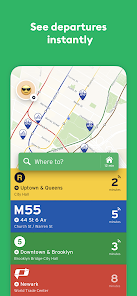
The usage experience is where Transit truly shines. From the moment you open the app, it pinpoints your location and immediately surfaces all nearby transit options—buses, subways, trains, and even bike-share and scooter networks—on a single, easy-to-read map. The live movement of vehicles on the map, complete with minute-by-minute arrival predictions, provides a crystal-clear picture of your immediate mobility landscape. What's more, the app cleverly integrates alternative modes like Uber, Lyft, and walking directions to create seamless, multi-modal trip plans. It learns your frequent routes and can send you "Go" alerts when it's time to leave, acting as a personal transit assistant. The sense of community, where users can contribute real-time crowding updates or report issues, adds a layer of human intelligence that static schedules can never match.
In a sea of navigation tools, Transit earns its spot on your home screen through sheer utility and thoughtful design. It doesn't try to do everything; it aims to do one thing exceptionally well: get you where you need to go using public transit, efficiently and with less hassle. While other apps might offer transit data as an afterthought, Transit places it front and center, refined through years of user feedback and technological iteration. For anyone tired of guessing, waiting, or missing connections, this app is a game-changer. It turns the daily commute from a gamble into a predictable part of your day. Ready to stop wondering and start knowing? Join millions of savvy commuters and download Transit: Bus & Subway Times today—your bus (and your sanity) will thank you! 🚌🚇🕒📱🗺️👍🎯✨🚶♂️🔔
features
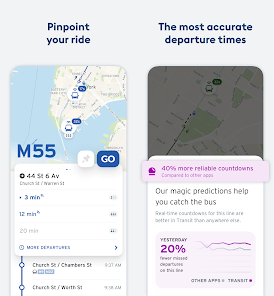
- 🚍 Live Vehicle Tracking: See buses and trains move in real-time on a detailed map. The app pulls direct GPS feeds from transit agencies, so you can watch your bus approach your stop, eliminating the guesswork of whether the posted schedule is accurate.
- 🔔 Go Alerts & Notifications: Set up alerts for your regular trips. The app will notify you when it's time to leave, based on real-time traffic and transit data, and can even wake you up from a nap with a "Last Call" alert so you don't miss your stop.
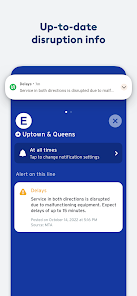
- 👥 Crowdsourced Updates: Tap into the power of the community. Users can report how crowded a bus or train is, note service disruptions, or confirm vehicle locations, providing a layer of human verification that complements official data.
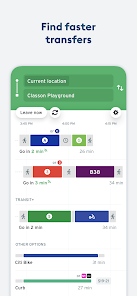
- 🔄 Seamless Trip Planning: Get door-to-door itineraries that mix and match transit modes. The app combines public transit with walking, bike-share, scooters, and ride-hailing services to find you the fastest or simplest route.
- ⭐ Favorites & Routine Builder: Save your home, work, and other frequent destinations. The app learns your habits and prominently displays departure times for your most-used routes right on the main screen for instant access.
- 🚲 Bike & Scooter Integration: View nearby bike-share stations and scooter availability directly on the map. The app can include these micromobility options in your planned route for the first or last mile of your journey.
- 📊 Step-by-Step Navigation: Once you start a trip, get clear, turn-by-turn guidance. It tells you which stop to get off at, when to transfer, and even which subway car to board for the easiest exit at your destination.
- 🌙 Dark Mode & Accessibility: A full system-wide dark mode is available to reduce eye strain during late-night travels. The app also prioritizes clear, legible fonts and high-contrast visuals for better accessibility.
- 🚶 Real-Time Walking Directions: Integrated walking directions guide you from your current spot to the transit stop or between transfer points, with an accurate estimated walking time that factors into your total trip duration.
- 📱 Offline Capability: While at its best with data, the app stores crucial schedule information offline. You can still access saved routes and basic timetables even in subway tunnels or areas with poor connectivity.
pros
- 🎯 Pinpoint Accuracy: The real-time predictions are famously reliable. By aggregating data from official sources and user reports, the app provides a trustworthy countdown that you can base your sprint to the stop on.
- 👌 Incredibly Intuitive Design: The interface is clean, uncluttered, and easy to grasp instantly. Information is presented logically, with color-coded routes and clear icons, making it usable for everyone from tech novices to power users.
- 🤝 Strong Community Feel: The crowdsourcing features create a sense of camaraderie among riders. Knowing someone just reported that the bus is five minutes away or that a train car is empty adds a reassuring human element to your trip.
- ⚡ Lightning-Fast Performance: The app loads quickly and updates information without lag. This speed is critical when you're making split-second decisions about which route to take or whether you can grab a coffee before the bus arrives.
- 🔒 Respect for Privacy: The app is transparent about data use, emphasizing that location data is used to improve service predictions and is not sold to third parties. You can use the core features without creating an account.
- 🌍 Excellent Coverage: It supports a vast number of cities across the U.S., Canada, and internationally. If a city has public transit, chances are Transit has integrated its data, making it a versatile tool for travelers.
- 💡 Proactive Assistance: Features like Go Alerts and trip suggestions feel like having a thoughtful friend managing your commute. The app anticipates your needs instead of just reacting to your queries.
- 🔄 Constant Refinement: The developers are consistently rolling out updates, bug fixes, and new features based on user feedback. The app you use today is noticeably better than the version from six months ago.
cons
- 📶 Data Dependency: The most powerful features, like live tracking, require a stable internet connection. In areas with poor service or on underground subways, the app's functionality can be limited until you regain connectivity.
- 🏙️ Variable City Support: While coverage is broad, the depth of features can vary significantly by city. Some metropolitan areas get full real-time data and bike integration, while others might only have basic schedules.
- 🔋 Battery Consumption: Keeping GPS and live data active for real-time tracking and navigation can be a drain on your phone's battery, especially during longer commuting sessions or when using the app for extensive trip planning.
- 🔄 Occasional Sync Glitches: Rarely, the app might display outdated information or fail to refresh vehicle locations immediately. This usually resolves quickly but can cause momentary confusion during critical travel moments.
- 🎨 Limited Customization: The app's clean design comes with trade-offs. Users looking to heavily customize the interface, map views, or notification types may find the options somewhat restrictive.
- 📢 Notification Overload: If you have many favorite routes or are in a dense transit area, managing the volume of potential alerts and notifications requires some fine-tuning to avoid being overwhelmed.
Articles
![]()
How to Get Robux Safely Without Scams
![]()
How to Download Older Versions of Android Apps
![]()
How to Download Games on Google Play for the First Time
![]()
What Is an APK File for Android? Everything You Need to Know
![]()
Do Free Robux Generators Work?
![]()
Robux Pricing Guide (2026 Update): How Much Robux Really Costs
![]()
How to Avoid Scams in Roblox
![]()
Rarest Pets in Adopt Me! (2026 Update)
![]()
How to Trade Safely in Adopt Me! (So You Don't Lose Everything)
![]()
Secret Tricks Nobody Tells You in 'Steal a Brainrot'
![]()
Beginner Guide: Don't Lose Your Brainrot
![]()
How to Steal in 'Steal a Brainrot' Without Getting Caught (Or at Least Not Instantly)
![]()
Is Brookhaven RP Worth Playing? It Depends on What You’re Looking For
![]()
Why Blox Fruits Is So Popular? Here’s Why Everyone Keeps Playing It
![]()
Best Roblox Obby Games for Beginners (2026): Learn the Game Without Hitting a Wall
![]()
Top 10 Roblox Horror Games (2026): The Scariest Experiences You Can't Miss
















Hot Apps
-
![]()
ChatGPT
OpenAI4.7

-
![]()
Direct Express®
i2c Inc.4.3 -
![]()
ChatBot - AI Chat
X PhotoKit4.5 -
![]()
letgo: Buy & Sell Used Stuff
letgo3.3 -
![]()
Microsoft Copilot
Microsoft Corporation4.8 -
![]()
GasBuddy: Find & Pay for Gas
PDI Software, Inc.3.1 -
![]()
DoorDash - Food Delivery
DoorDash4.6 -
![]()
FaceApp: Perfect Face Editor
FaceApp Technology Ltd4.4 -
![]()
Uber - Request a ride
Uber Technologies, Inc.4.6 -
![]()
Google Chat
Google LLC4.4 -
![]()
Google Chrome: Fast & Secure
Google LLC4.1 -
![]()
Bolt: Request a Ride
Bolt Technology4.8 -
![]()
Netflix
Netflix, Inc.3.9 -
![]()
Geeni
Merkury Innovations4.6 -
![]()
Sora by OpenAI
OpenAI4.7 -
![]()
Affirm: Buy now, pay over time
Affirm, Inc4.7 -
![]()
Pandora - Music & Podcasts
Pandora4.1 -
![]()
DeepSeek - AI Assistant
DeepSeek4.2 -
![]()
Google Gemini
Google LLC4.6 -
![]()
PolyBuzz: Chat with AI Friends
CLOUD WHALE INTERACTIVE TECHNOLOGY LLC.3.8 -
![]()
SiriusXM: Music, Sports & News
SiriusXM4.6 -
![]()
GroupMe
GroupMe4.5 -
![]()
Wise: International Transfers
Wise Payments Ltd.4.7 -
![]()
Zoom - One Platform to Connect
zoom.us4.1 -
![]()
Google Maps
Google LLC4.2 -
![]()
MyFitnessPal: Calorie Counter
MyFitnessPal, Inc.4.3 -
![]()
Hulu: Stream TV shows & movies
Disney4.5 -
![]()
Passport Parking
Passport Labs, Inc.2.5 -
![]()
PayPal - Send, Shop, Manage
PayPal Mobile4.3 -
![]()
Grok
xAI4.9






























Disclaimer
1.Appinfocenter does not represent any developer, nor is it the developer of any App or game.
2.Appinfocenter provide custom reviews of Apps written by our own reviewers, and detailed information of these Apps, such as developer contacts, ratings and screenshots.
3. All trademarks, registered trademarks, product names and company names or logos appearing on the site are the property of their respective owners.
4.Appinfocenter abides by the federal Digital Millennium Copyright Act (DMCA) by responding to notices of alleged infringement that complies with the DMCA and other applicable laws.
5.If you are the owner or copyright representative and want to delete your information, please contact us [email protected].
6.All the information on this website is strictly observed all the terms and conditions of Google Ads Advertising policies and Google Unwanted Software policy.
7.Appinfocenter.com is an independent, information-only website which is 100% free to all the users.