Microsoft Outlook

1B+
Installs
Microsoft Corporation
Developer
-
Productivity
Category
-
Rated for 3+
Content Rating
-
http://taps.io/outlookprivacy
Privacy Policy
Screenshots
editor reviews
In the bustling digital landscape where communication tools abound, Microsoft Outlook stands as a colossal titan, a comprehensive suite that has evolved far beyond its origins as a simple email client. Developed by Microsoft Corporation, this powerhouse application has seamlessly integrated email, calendar, contacts, tasks, and file management into a single, cohesive hub. Its journey from a desktop-bound program to a ubiquitous, cloud-synced platform across Windows, macOS, iOS, and Android is a testament to its adaptability and enduring relevance. For millions of professionals, students, and organizations, Outlook is the central nervous system of their daily digital operations, orchestrating workflows with a blend of robust functionality and familiar Microsoft ecosystem integration. 🚀📧💼🔄🗓️📱💻🌐🤝📈
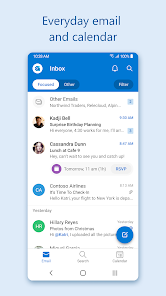
The user experience with Outlook is characterized by its depth and polish. Navigating through a crowded inbox feels intuitive with features like Focused Inbox, which intelligently separates crucial messages from promotional clutter. The calendar view is not just for appointments; it becomes a dynamic command center for scheduling meetings across time zones, booking rooms, and sharing availability with colleagues. The seamless integration with other Microsoft 365 apps like Teams, Word, and OneDrive creates a fluid environment where you can edit a document attached to an email without ever leaving the app. This holistic approach saves precious time and reduces the cognitive load of constantly switching between applications. Choosing Outlook among a sea of alternatives often boils down to this unparalleled ecosystem synergy, especially for those already embedded in the Microsoft universe. Its reliability, enterprise-grade security features, and constant innovation make it a default, trusted choice. ✨📨🧠⏰🤖📎🛡️🧩⚙️
Ultimately, the decision to use Outlook is an investment in a centralized, powerful, and scalable communication and productivity platform. Whether managing a complex corporate email account or coordinating a community project, Outlook provides the tools to do it efficiently. Its ability to tame chaos, foster collaboration, and keep you perfectly synchronized across all devices is its core appeal. If you're seeking an all-in-one solution that grows with your needs and connects effortlessly with the tools you likely already use, look no further. Ready to transform your digital workflow and bring order to your communication chaos? The gateway to a more organized and productive day is just a download away. Embrace the power of integrated productivity—download Microsoft Outlook today and experience the difference! 🎯📂🤯🚨🤝📲🌟🔥✅
features
- 📧 Intelligent Inbox Management: Outlook's Focused Inbox automatically sorts your emails, prioritizing messages from important contacts while filtering newsletters and promotions into a separate "Other" tab. Sweep rules and one-click archiving tools help you keep a zero-inbox with minimal effort.
- 🗓️ Dynamic Calendar & Scheduling: This is more than a simple date tracker. The calendar allows for intricate meeting scheduling, sends automated availability polls (FindTime), and seamlessly integrates with Microsoft Teams for virtual meetings. You can view shared calendars side-by-side and overlay them for perfect planning.
- 👥 Integrated People & Contacts: Your contacts are deeply linked with your mail and calendar. It automatically suggests adding people you email frequently, stores their contact details, and shows a history of your recent interactions, files shared, and upcoming meetings with them right from their contact card.
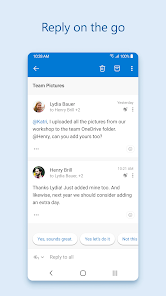
- 📎 Seamless File Handling & Cloud Integration: Attaching files is a breeze with direct access to OneDrive, SharePoint, and your local device. You can preview most file types within the email and even co-edit Office documents in real-time with colleagues without downloading anything.
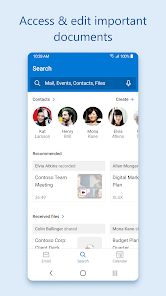
- 🔍 Powerful Search & Organization: Finding any email, attachment, or contact from years ago is remarkably fast. Advanced search filters and the ability to create custom search folders make retrieving information almost instantaneous, acting like a personal digital archivist.
- 🛡️ Advanced Security & Protection: Outlook comes fortified with enterprise-level security. Features include built-in encryption for sensitive emails, advanced threat protection against phishing links and malware, and data loss prevention policies that warn you before sending confidential information to the wrong person.
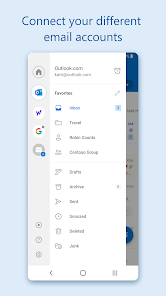
- 📱 Cross-Platform Consistency: The experience is beautifully synchronized across your phone, tablet, and computer. Actions taken on one device reflect instantly on all others. The mobile app is particularly robust, offering nearly all desktop functionalities in a touch-optimized interface.
- 🤖 Automation with Rules & Quick Steps: Automate repetitive tasks to save time. Create rules to automatically move, flag, or categorize incoming mail. Quick Steps let you perform multi-action routines, like moving a message to a specific folder and replying with a template, with a single click.
- 🎨 Customizable Interface & Add-ins: Tailor Outlook to your workflow. Change the layout, density, and theme. The integrated add-in store allows you to connect services like Trello, Evernote, or Zoom directly into your email pane, supercharging your productivity.
- 📝 Task Management Hub: Turn emails into actionable tasks with a single click. The Tasks module integrates with To-Do and Flagged Emails, creating a unified list of priorities that syncs across all your devices, ensuring nothing falls through the cracks.
pros
- 🌟 Unrivaled Ecosystem Integration: Its deep, native connection with the entire Microsoft 365 suite (Teams, OneDrive, Office Apps) is its killer feature. This creates a frictionless workflow that competitors struggle to match, making collaboration incredibly smooth.
- ⚡ Reliability and Scale: Built on robust enterprise infrastructure, Outlook is exceptionally reliable for handling massive volumes of email and data. It scales effortlessly from individual use to large multinational corporations without compromising performance.
- 🧠 Smart, Proactive Features: From Focused Inbox to suggested replies and meeting time suggestions, Outlook uses AI to anticipate your needs and reduce manual work. It feels less like a passive tool and more like an active assistant.
- 🔒 Top-Tier Security Compliance: For business users, its compliance with global standards (like GDPR) and advanced administrative controls for data governance provide peace of mind that sensitive communications are protected.
- 🔄 Flawless Synchronization: The sync between the desktop, web, and mobile apps is virtually instantaneous and flawless. You never have to worry about which device you used last; your entire state is always up to date everywhere.
- 📊 Comprehensive Feature Set: It packs an enormous amount of functionality into one package. You rarely need a separate app for calendars, contacts, light project management, or note-taking, consolidating your digital toolkit.
- 🛠️ Extensive Customization and Control: Power users can dive deep into rules, forms, and VBA scripting (on desktop), while casual users can enjoy simple layout tweaks. This range accommodates virtually all skill levels and needs.
- 🌍 Excellent for Team Collaboration: Features like shared mailboxes, calendar publishing, delegate access, and integrated Teams meetings make it an indispensable tool for any team that needs to coordinate closely and efficiently.
- 📶 Strong Offline Capability: The desktop client allows you to read, write, and organize emails even without an internet connection. Changes sync automatically once you're back online, ensuring productivity isn't halted by connectivity issues.
- 💸 Generous Free Tier & Value: The Outlook.com free version offers a substantial 15GB of mailbox storage integrated with OneDrive, a full-featured web and mobile app, and excellent spam filtering, providing tremendous value at no cost.
cons
- 🐌 Can Feel Bloated and Complex: The sheer number of features and menu options can be overwhelming for new users or those who just want a simple, fast email experience. The interface sometimes feels cluttered.
- 💰 Premium Features Locked Behind Subscription: To unlock the full potential, including desktop app premium features, advanced security, and custom domains, a paid Microsoft 365 subscription is required, which adds to the cost of ownership.
- 🔄 Occasional Sync Quirks: While generally excellent, very rare sync delays or inconsistencies can occur between the mobile app and desktop client, especially with complex folder rules or categories, leading to momentary confusion.
- 📧 Search Can Be Overwhelming: The powerful search sometimes returns too many results without intuitive filtering on the first pass. Mastering the search syntax is needed to get pinpoint accuracy in very large mailboxes.
- 🖥️ Desktop App Resource Usage: The full-featured desktop application (part of Office) can be a significant resource hog, consuming considerable RAM and CPU, which might slow down older or less powerful computers.
- 🎯 Focused Inbox Isn't Perfect for Everyone: The AI sorting of Focused Inbox sometimes misplaces important emails into the "Other" tab, causing users to miss critical messages if they don't regularly check both sections.
- 🔌 Add-in Performance Variability: While add-ins extend functionality, some third-party add-ins can slow down Outlook's startup time or cause stability issues, requiring careful management.
- 📱 Mobile Notification Management: Managing notifications for multiple accounts and specific folders on the mobile app can be less granular and more cumbersome compared to some dedicated mobile-first email clients.
- 🛠️ Advanced Setup Requires IT Knowledge: Configuring advanced features like delegate permissions, shared mailboxes, or complex server rules often requires administrative knowledge or an IT department, making it less DIY-friendly for small teams.
- 🎨 Limited Visual Customization on Mobile: Compared to the desktop version, the mobile app offers fewer options for changing its visual theme and layout, providing a more standardized, less personalized experience.
Recommended Apps
![]()
Emoji Home: Make Messages Fun
Emoji Home4.5

![]()
Planner 5D: Home Design, Decor
Planner 5D3.8![]()
Live Wallpaper- 4k Backgrounds
DEHA4.6![]()
Love Horoscopes
Horoscope TV4.2![]()
Fake video call - Prank call
HiddenScreen.NET0![]()
Fake call - prank
GameAndro4.5![]()
Wednesday Addams Prank Call
Prank Calling4![]()
Grindr - Gay Dating & Chat
Grindr LLC4.1![]()
GhostTube SLS Camera Alternate
GhostTube4![]()
Photo Blender: Picture Mixer
VysionApps4.1![]()
Make Me Bald Prank
AppTornado2.5![]()
GPS Navigation Maps Directions
SaaAneeDroid4.2![]()
Daily Horoscope
Horoscope by Comitic4.8![]()
Face Swap Gender Swap&Changer
Energy apps2.8![]()
The Pattern Astrology
Pattern Home, Inc.3.9














Hot Apps
-
![]()
Chai: Chat AI Platform
Chai Research Corp.4.4 -
![]()
Geeni
Merkury Innovations4.6 -
![]()
Snapchat
Snap Inc4.1 -
![]()
Netflix
Netflix, Inc.3.9 -
![]()
Sora by OpenAI
OpenAI4.7 -
![]()
Amazon Alexa
Amazon Mobile LLC4.5 -
![]()
Venmo
PayPal, Inc.4.2 -
![]()
ParkMobile: Park. Pay. Go.
Parkmobile, LLC4.7 -
![]()
Afterpay - Buy Now Pay Later
Afterpay3.8 -
![]()
letgo: Buy & Sell Used Stuff
letgo3.3 -
![]()
Uber - Request a ride
Uber Technologies, Inc.4.6 -
![]()
Google Chat
Google LLC4.4 -
![]()
MyFitnessPal: Calorie Counter
MyFitnessPal, Inc.4.3 -
![]()
Passport Parking
Passport Labs, Inc.3.4 -
![]()
DeepSeek - AI Assistant
DeepSeek4.2 -
![]()
Domino's Pizza USA
Domino's Pizza LLC4.7 -
![]()
Direct Express®
i2c Inc.4.3 -
![]()
Microsoft Copilot
Microsoft Corporation4.8 -
![]()
Wise: International Transfers
Wise Payments Ltd.4.7 -
![]()
ChatOn - AI Chat Bot Assistant
AIBY Inc.4.4 -
![]()
Google Pay
Google LLC4.4 -
![]()
ChatBot - AI Chat
X PhotoKit4.5 -
![]()
Bolt: Request a Ride
Bolt Technology4.8 -
![]()
Amazon Fire TV
Amazon Mobile LLC4.1 -
![]()
Google Home
Google LLC4.2 -
![]()
Hulu: Stream TV shows & movies
Disney4.5 -
![]()
Facebook
Meta Platforms, Inc.4 -
![]()
Affirm: Buy now, pay over time
Affirm, Inc4.7 -
![]()
CapCut - Video Editor
Bytedance Pte. Ltd.4 -
![]()
YouTube
Google LLC4.1






























Disclaimer
1.Appinfocenter does not represent any developer, nor is it the developer of any App or game.
2.Appinfocenter provide custom reviews of Apps written by our own reviewers, and detailed information of these Apps, such as developer contacts, ratings and screenshots.
3. All trademarks, registered trademarks, product names and company names or logos appearing on the site are the property of their respective owners.
4.Appinfocenter abides by the federal Digital Millennium Copyright Act (DMCA) by responding to notices of alleged infringement that complies with the DMCA and other applicable laws.
5.If you are the owner or copyright representative and want to delete your information, please contact us [email protected].
6.All the information on this website is strictly observed all the terms and conditions of Google Ads Advertising policies and Google Unwanted Software policy.
7.Appinfocenter.com is an independent, information-only website which is 100% free to all the users.