
Picsart AI Photo Editor, Video

1B+
Installs
PicsArt, Inc.
Developer
-
Video Players & Editors
Category
-
Rated for 12+
Content Rating
-
https://picsart.com/privacy-policy
Privacy Policy
Screenshots
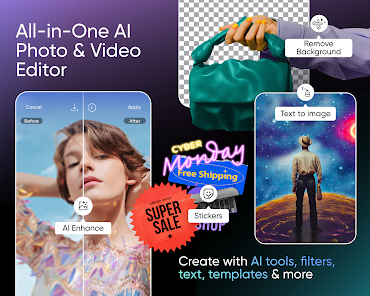
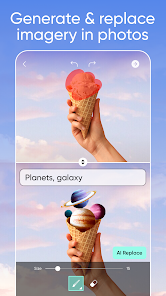

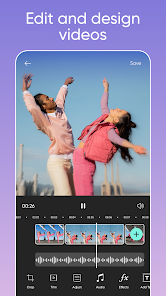
editor reviews
In the bustling digital arena where creativity meets technology, Picsart has carved out a formidable reputation. The Picsart AI Photo Editor & Video app represents the culmination of years of development, evolving from a robust photo editing tool into a comprehensive, AI-powered creative suite. My journey with this app has been one of delightful discovery; it feels less like a rigid software and more like a playful, intelligent studio that fits in your pocket. The experience is characterized by its sheer breadth—whether you're applying a subtle filter, orchestrating a complex collage, or animating a static image, the tools feel both powerful and surprisingly accessible. The interface, while packed with options, guides you with intuitive gestures and smart suggestions, making professional-grade edits achievable without a steep learning curve.
Choosing Picsart over a sea of competitors wasn't a difficult decision. While other apps might excel in a single niche, like pure filter applications or basic cut-and-paste collages, Picsart offers a harmonious blend of everything. It's the Swiss Army knife for visual content creators. The integration of generative AI tools sets it apart in a monumental way. Instead of just adjusting what's already there, you can now create entirely new elements, remove objects seamlessly, or restyle photos with a text prompt. This forward-thinking approach transforms it from an editor into a co-creator. For social media enthusiasts, small business owners, or even casual photographers, it eliminates the need to juggle multiple apps, providing a one-stop solution for images, videos, and even graphic design elements.
The true magic of Picsart lies in its democratization of advanced editing. Features that once required expensive desktop software and years of training are now available at your fingertips, interpreted through a friendly and often fun lens. The app encourages experimentation, and with its massive library of stickers, fonts, and effects, no two creations ever have to look the same. Its constant updates and community-driven challenges keep the content fresh and the creative juices flowing. From quick touch-ups to elaborate digital art projects, Picsart scales effortlessly to match your ambition. If you're ready to unlock a new level of visual expression and streamline your creative workflow, downloading Picsart is the obvious next step. 🚀🎨📱✨🌟🎭🖼️💡🔥🎬
features
- 🤖 AI-Powered Magic Tools: The suite of AI tools is revolutionary. Features like AI Replace allow you to swap skies or change outfits with a tap, while AI Generate can create new backgrounds or objects from a simple text description. The AI Enhance tool automatically improves photo clarity and color.
- 🎞️ All-in-One Video Editor: This isn't just for photos. The app includes a fully-featured video editor with trimming, splicing, speed control, and the ability to add music, text, and the same vast library of effects and overlays available for images.
- ✂️ Precision Cut-Out & Layers: The cut-out tool is exceptionally sharp, making it easy to isolate subjects and create stickers or composites. The layer functionality provides granular control, letting you stack images, text, and effects non-destructively.
- 🛠️ Professional-Grade Photo Tools: Access a complete toolkit: curves, selective color editing, healing and clone stamps, dispersion effects, and a myriad of blending modes. It offers the depth serious editors crave without the complexity.
- 📚 Massive Content Library: Dive into an endless reservoir of user-generated and professional content—millions of stickers, fonts, pre-made templates, backgrounds, and frames. It's an incredible resource for inspiration and quick project assembly.
- 👥 Vibrant Creative Community: The app has a built-in social network where you can share edits, participate in daily challenges, and remix other users' public projects. This fosters inspiration and provides a platform for showcasing work.
- 🎨 Custom Brushes & Drawing: Unleash your inner artist with a versatile drawing tool. Create custom brushes, adjust flow and opacity, and sketch directly onto your photos or a blank canvas.
- 🔄 Remix & Templates: Jumpstart any project by using a professionally designed template or by 'remixing' a public project from the community. This feature is perfect for creating cohesive social media stories or ads quickly.
- 📤 Seamless Sharing & Export: Once your masterpiece is complete, export it in high resolution without watermarks (on paid plans) and share it directly to all major social platforms or save it to your device with optimized settings.
- 🔍 Object & Background Removal: The AI Remove tool works wonders. With a simple brush stroke, you can delete unwanted objects, people, or even the entire background with impressive accuracy, leaving a clean, editable layer behind.
pros
- 🌈 Unmatched Versatility: Its greatest strength is being a unified platform. You can edit a photo, turn it into a video slideshow, design a poster, and create an animated sticker—all without leaving the app. This saves immense time and hassle.
- 🧠 Intelligent & Intuitive AI: The AI features genuinely understand intent. Describing a scene like 'sunset over mountains' often yields surprisingly usable and artistic results, making advanced compositing accessible to everyone.
- 💎 Polished User Interface: Despite its power, the UI is clean, well-organized, and responsive. Tools are logically grouped, and helpful tutorials pop up for new features, making navigation smooth even for beginners.
- 🌍 Constant Innovation: The development team regularly rolls out groundbreaking features. The app never feels stagnant; there's always a new filter pack, AI model, or community trend to explore, keeping the creative process exciting.
- 🎯 Powerful Free Tier: You can accomplish a surprising amount without spending a dime. The free version offers access to core editing tools, a large content library, and basic AI features, which is more generous than many competitors.
- 🤝 Community-Driven Inspiration: The integrated social feed is a goldmine for ideas. Seeing how others use the tools can teach you new techniques and push your creative boundaries in unexpected directions.
- ⚡ Quick Processing Speed: Even complex AI generation or high-resolution exports happen relatively quickly on modern devices, minimizing frustrating wait times and keeping you in a creative flow state.
cons
- 💰 Aggressive Subscription Model: The push towards a paid 'Gold' subscription is very prominent. Key features like high-res exports without watermarks, many premium AI tools, and top-tier content are locked behind a recurring paywall, which can feel restrictive.
- 📱 Performance on Older Devices: On older smartphones or tablets, the app can become sluggish, especially when using resource-intensive AI features or working with multiple high-resolution layers. It may crash or heat up the device.
- 🎪 Occasional Cluttered Feel: The sheer number of options, pop-ups for new packs, and community notifications can sometimes make the interface feel busy and overwhelming, distracting from the core editing task at hand.
- 🤔 AI Inconsistencies: While often impressive, the AI generation can be hit-or-miss. It sometimes misinterprets prompts or produces low-quality, distorted elements, requiring multiple attempts to get a usable result.
- 🔒 Privacy Considerations: As with any app using cloud-based AI processing, there are questions about how user-uploaded images and data are used. The privacy policy is extensive, and users must be comfortable with cloud processing for best results.
- 📶 Heavy Internet Reliance: Many of the best features, especially AI generation and accessing the online content library, require a stable and strong internet connection. Offline functionality is significantly limited.
- 🔄 Steep Learning Curve for Advanced Features: Unlocking the full potential of layers, blending modes, and custom brushes isn't intuitive. Mastering these professional tools requires seeking out external tutorials or extensive trial and error.
Recommended Apps
![]()
Emoji Home: Make Messages Fun
Emoji Home4.5

![]()
Planner 5D: Home Design, Decor
Planner 5D3.8![]()
Live Wallpaper- 4k Backgrounds
DEHA4.6![]()
Love Horoscopes
Horoscope TV4.2![]()
Fake video call - Prank call
HiddenScreen.NET0![]()
Fake call - prank
GameAndro4.5![]()
Wednesday Addams Prank Call
Prank Calling4![]()
Grindr - Gay Dating & Chat
Grindr LLC4.1![]()
GhostTube SLS Camera Alternate
GhostTube4![]()
Photo Blender: Picture Mixer
VysionApps4.1![]()
Make Me Bald Prank
AppTornado2.5![]()
GPS Navigation Maps Directions
SaaAneeDroid4.2![]()
Daily Horoscope
Horoscope by Comitic4.8![]()
Face Swap Gender Swap&Changer
Energy apps2.8![]()
The Pattern Astrology
Pattern Home, Inc.3.9











Hot Apps
-
![]()
Chai: Chat AI Platform
Chai Research Corp.4.4 -
![]()
Geeni
Merkury Innovations4.6 -
![]()
Snapchat
Snap Inc4.1 -
![]()
Netflix
Netflix, Inc.3.9 -
![]()
Sora by OpenAI
OpenAI4.7 -
![]()
Amazon Alexa
Amazon Mobile LLC4.5 -
![]()
Venmo
PayPal, Inc.4.2 -
![]()
ParkMobile: Park. Pay. Go.
Parkmobile, LLC4.7 -
![]()
Afterpay - Buy Now Pay Later
Afterpay3.8 -
![]()
letgo: Buy & Sell Used Stuff
letgo3.3 -
![]()
Uber - Request a ride
Uber Technologies, Inc.4.6 -
![]()
Google Chat
Google LLC4.4 -
![]()
MyFitnessPal: Calorie Counter
MyFitnessPal, Inc.4.3 -
![]()
Passport Parking
Passport Labs, Inc.3.4 -
![]()
DeepSeek - AI Assistant
DeepSeek4.2 -
![]()
Domino's Pizza USA
Domino's Pizza LLC4.7 -
![]()
Direct Express®
i2c Inc.4.3 -
![]()
Microsoft Copilot
Microsoft Corporation4.8 -
![]()
Wise: International Transfers
Wise Payments Ltd.4.7 -
![]()
ChatOn - AI Chat Bot Assistant
AIBY Inc.4.4 -
![]()
Google Pay
Google LLC4.4 -
![]()
ChatBot - AI Chat
X PhotoKit4.5 -
![]()
Bolt: Request a Ride
Bolt Technology4.8 -
![]()
Amazon Fire TV
Amazon Mobile LLC4.1 -
![]()
Google Home
Google LLC4.2 -
![]()
Hulu: Stream TV shows & movies
Disney4.5 -
![]()
Facebook
Meta Platforms, Inc.4 -
![]()
Affirm: Buy now, pay over time
Affirm, Inc4.7 -
![]()
CapCut - Video Editor
Bytedance Pte. Ltd.4 -
![]()
YouTube
Google LLC4.1






























Disclaimer
1.Appinfocenter does not represent any developer, nor is it the developer of any App or game.
2.Appinfocenter provide custom reviews of Apps written by our own reviewers, and detailed information of these Apps, such as developer contacts, ratings and screenshots.
3. All trademarks, registered trademarks, product names and company names or logos appearing on the site are the property of their respective owners.
4.Appinfocenter abides by the federal Digital Millennium Copyright Act (DMCA) by responding to notices of alleged infringement that complies with the DMCA and other applicable laws.
5.If you are the owner or copyright representative and want to delete your information, please contact us [email protected].
6.All the information on this website is strictly observed all the terms and conditions of Google Ads Advertising policies and Google Unwanted Software policy.
7.Appinfocenter.com is an independent, information-only website which is 100% free to all the users.