Skype for Business for Android

10M+
Installs
Microsoft Corporation
Developer
-
Business
Category
-
Rated for 3+
Content Rating
-
https://go.microsoft.com/fwlink/?LinkId=510643
Privacy Policy
Screenshots
editor reviews
In the bustling arena of enterprise communication, where seamless connectivity is paramount, Skype for Business for Android stands as a formidable pillar. Developed by Microsoft Corporation, this application is far more than a simple messaging tool; it is a comprehensive, mobile-centric portal to your professional ecosystem. It transforms your Android device into a powerful hub for meetings, instant messaging, and voice calls, all integrated deeply with the familiar Office 365 and Microsoft 365 environments. The experience feels like carrying a compact, yet fully-equipped conference room in your pocket, ready to deploy at a moment's notice whether you are commuting, working remotely, or stepping out between office meetings. 🚀💼📱🌐🤝🎯✨🔧📞💡
The evolution of this app mirrors the shift towards flexible, hybrid work models. It builds upon the legacy of Lync, inheriting enterprise-grade security and reliability, while adopting the more recognizable Skype interface for user familiarity. Using the app feels intuitive; the design is clean and purpose-driven, prioritizing quick access to your contacts, upcoming meetings, and conversation history. Joining a scheduled meeting is often just a single tap away, thanks to calendar integration. The audio and video quality is consistently robust, engineered to perform well even on fluctuating mobile networks, ensuring you remain a clear and present participant in critical discussions. This focus on reliable performance in diverse conditions sets a strong foundation for professional use. 📈🔄🔒🛡️🎨👥🗓️✅🎙️📹
Choosing Skype for Business among a sea of collaboration apps boils down to its deep institutional integration and trusted pedigree. For organizations already invested in the Microsoft stack, it is the natural, frictionless choice. It eliminates the need for multiple logins or context-switching between platforms, as your work identity, contacts, and files are all interconnected. While competitors may offer flashier interfaces or broader consumer features, Skype for Business excels in delivering a secure, managed, and efficient communication channel that aligns perfectly with corporate IT policies and workflows. For any professional whose organization relies on Microsoft's ecosystem, downloading this app is not just an option; it's an essential step to staying connected and productive. 🏢⚙️🔗🤔🆚🏆🛡️📲🚨 Don't wait to empower your mobile work life—download Skype for Business for Android today and bring the full power of your office communications to your fingertips! ⬇️📥🔥📈💪🎉
features
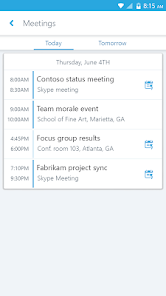
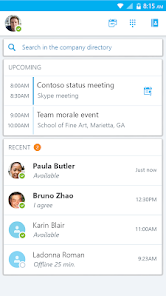
- 🎯 Integrated Calendar View: Your day's schedule is front and center. The app seamlessly pulls meetings from your Exchange or Office 365 calendar, displaying them in a clear list. With one tap, you can join an online meeting, seeing details like the organizer and other attendees before connecting.
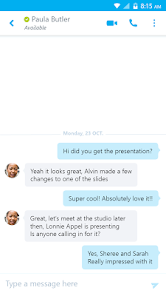
- 🤝 Persistent Chat & History: Conversations don't vanish. Both one-on-one and group chats are persistent, meaning you can scroll back through history to find files, decisions, or links shared days or weeks ago. This continuity is crucial for tracking project evolution and team discussions.
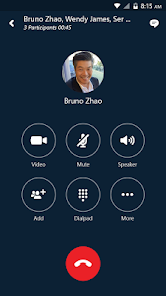
- 📞 High-Quality Voice & Video Calling: Experience clear, reliable calls. The app is optimized for mobile networks, using advanced codecs to maintain call quality. You can easily switch between voice-only and video during a call, and even use the rear-facing camera to show your surroundings.
- 👥 Organizational Contact Directory: Find colleagues instantly. Beyond your personal contacts, the app provides direct access to your company's global address book. Search by name, skill, or department to connect with the right person without needing their direct contact information.
- 🛡️ Enterprise-Grade Security: Communications are built on a foundation of trust. All data is encrypted in transit and at rest, adhering to Microsoft's stringent compliance standards. IT departments can manage policies, ensuring secure access and data protection.
- 📎 File Sharing & Collaboration: Share documents directly within conversations. You can send files from your device or, more powerfully, link directly to files stored in OneDrive for Business or SharePoint. Recipients can view them immediately without cumbersome email attachments.
- 🔔 Real-Time Notifications & Presence: Know who's available. The presence indicator (showing Available, Busy, Away, etc.) updates in real time. Coupled with customizable push notifications, you'll never miss an important message or meeting invite.
- 🎙️ Background Audio for Meetings: Multitask during conference calls. You can minimize the app and use other phone functions while remaining connected to a meeting's audio. This is perfect for referencing emails or notes while listening in.
- 💬 Instant Messaging with Rich Formatting: Communicate with clarity. The chat supports text formatting like bold, italics, and bullet points, making it easy to emphasize key points in written discussions, much like in a desktop client.
- 🔄 Seamless Desktop Continuity: Pick up where you left off. The mobile app syncs perfectly with the desktop version of Skype for Business. You can start a chat on your phone and continue it on your computer without missing a beat.
pros
- 🌟 Unmatched Microsoft Ecosystem Integration: This is its superpower. For users of Office 365, the app feels like a natural extension. Calendar, contacts, and file storage (OneDrive/SharePoint) work together flawlessly, creating a unified and efficient workflow.
- ⚡ Quick and Reliable Meeting Join: Getting into a meeting is exceptionally straightforward. Notifications for upcoming meetings are clear, and the join process is optimized to be fast, reducing the friction and anxiety of connecting late to important calls.
- 🏢 Corporate IT Management & Support: It's an enterprise citizen. IT admins can deploy, configure, and manage the app at scale using familiar Microsoft tools. This ensures consistency, security, and provides users with a supported, stable application.
- 🔒 Proven Security and Compliance: Organizations trust it with sensitive communications. The platform meets major industry and regulatory standards, giving companies and users peace of mind that their conversations and data are protected.
- 📱 Optimized for Mobile Use Cases: It understands you're on the go. Features like background audio, good battery life management, and an interface designed for touch screens make it a genuinely practical tool for mobile professionals.
cons
- ⚠️ Impending Service Retirement: The biggest caveat is the platform's future. Microsoft has announced the retirement of Skype for Business Online, with Teams being the successor. While the Android app remains functional for now, its long-term viability is limited, and new feature development has essentially ceased.
- 🔄 Transition to Microsoft Teams: This creates a disjointed experience. Many organizations are now using Teams, forcing users to juggle two apps. The Skype for Business app lacks the modern collaboration features (like channels, extensive app integrations) that Teams offers.
- 🎨 Outdated User Interface: The design feels stale. Compared to modern communication apps like Slack or Microsoft Teams itself, the interface appears dated and less visually engaging, which can impact user adoption and satisfaction.
- 📶 Occasional Connectivity Hiccups: While generally reliable, some users report sporadic issues with call quality, delayed messages, or difficulties in reconnecting after the app has been in the background for a long time, especially on weaker networks.
- 🔋 Can Be a Battery Drain: During intensive use, particularly with video calls enabled, the app can consume battery power significantly. This is a common challenge for many communication apps but is noticeable here during long meetings.
Recommended Apps
![]()
Emoji Home: Make Messages Fun
Emoji Home4.5

![]()
Planner 5D: Home Design, Decor
Planner 5D3.8![]()
Live Wallpaper- 4k Backgrounds
DEHA4.6![]()
Love Horoscopes
Horoscope TV4.2![]()
Fake video call - Prank call
HiddenScreen.NET0![]()
Fake call - prank
GameAndro4.5![]()
Wednesday Addams Prank Call
Prank Calling4![]()
Grindr - Gay Dating & Chat
Grindr LLC4.1![]()
GhostTube SLS Camera Alternate
GhostTube4![]()
Photo Blender: Picture Mixer
VysionApps4.1![]()
Make Me Bald Prank
AppTornado2.5![]()
GPS Navigation Maps Directions
SaaAneeDroid4.2![]()
Daily Horoscope
Horoscope by Comitic4.8![]()
Face Swap Gender Swap&Changer
Energy apps2.8![]()
The Pattern Astrology
Pattern Home, Inc.3.9















Hot Apps
-
![]()
Chai: Chat AI Platform
Chai Research Corp.4.4 -
![]()
Geeni
Merkury Innovations4.6 -
![]()
Snapchat
Snap Inc4.1 -
![]()
Netflix
Netflix, Inc.3.9 -
![]()
Sora by OpenAI
OpenAI4.7 -
![]()
Amazon Alexa
Amazon Mobile LLC4.5 -
![]()
Venmo
PayPal, Inc.4.2 -
![]()
ParkMobile: Park. Pay. Go.
Parkmobile, LLC4.7 -
![]()
Afterpay - Buy Now Pay Later
Afterpay3.8 -
![]()
letgo: Buy & Sell Used Stuff
letgo3.3 -
![]()
Uber - Request a ride
Uber Technologies, Inc.4.6 -
![]()
Google Chat
Google LLC4.4 -
![]()
MyFitnessPal: Calorie Counter
MyFitnessPal, Inc.4.3 -
![]()
Passport Parking
Passport Labs, Inc.3.4 -
![]()
DeepSeek - AI Assistant
DeepSeek4.2 -
![]()
Domino's Pizza USA
Domino's Pizza LLC4.7 -
![]()
Direct Express®
i2c Inc.4.3 -
![]()
Microsoft Copilot
Microsoft Corporation4.8 -
![]()
Wise: International Transfers
Wise Payments Ltd.4.7 -
![]()
ChatOn - AI Chat Bot Assistant
AIBY Inc.4.4 -
![]()
Google Pay
Google LLC4.4 -
![]()
ChatBot - AI Chat
X PhotoKit4.5 -
![]()
Bolt: Request a Ride
Bolt Technology4.8 -
![]()
Amazon Fire TV
Amazon Mobile LLC4.1 -
![]()
Google Home
Google LLC4.2 -
![]()
Hulu: Stream TV shows & movies
Disney4.5 -
![]()
Facebook
Meta Platforms, Inc.4 -
![]()
Affirm: Buy now, pay over time
Affirm, Inc4.7 -
![]()
CapCut - Video Editor
Bytedance Pte. Ltd.4 -
![]()
YouTube
Google LLC4.1






























Disclaimer
1.Appinfocenter does not represent any developer, nor is it the developer of any App or game.
2.Appinfocenter provide custom reviews of Apps written by our own reviewers, and detailed information of these Apps, such as developer contacts, ratings and screenshots.
3. All trademarks, registered trademarks, product names and company names or logos appearing on the site are the property of their respective owners.
4.Appinfocenter abides by the federal Digital Millennium Copyright Act (DMCA) by responding to notices of alleged infringement that complies with the DMCA and other applicable laws.
5.If you are the owner or copyright representative and want to delete your information, please contact us [email protected].
6.All the information on this website is strictly observed all the terms and conditions of Google Ads Advertising policies and Google Unwanted Software policy.
7.Appinfocenter.com is an independent, information-only website which is 100% free to all the users.