
Photo Tool

10M+
Installs
COLIFER LAB
Developer
-
Video Players & Editors
Category
-
Rated for 3+
Content Rating
-
https://www.colifer.vip/pt/pp.html
Privacy Policy
Screenshots
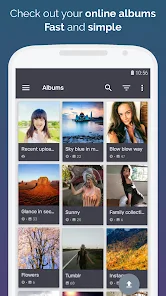

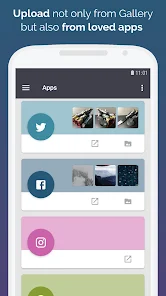

editor reviews
In the bustling digital marketplace where photo editing apps proliferate like wildflowers, finding one that balances power with simplicity can feel like a treasure hunt. Enter Photo Tool by COLIFER LAB, a surprisingly robust application that carves out its niche not by overwhelming users with endless filters, but by offering a curated, precision-focused toolkit. This app feels like the digital equivalent of a master craftsman's workbench: uncluttered, purposeful, and designed for those who appreciate fine control over their images. Its development philosophy seems centered on utility over spectacle, providing essential adjustments that photographers and casual users alike genuinely need. The usage experience is refreshingly straightforward, devoid of the labyrinthine menus and aggressive monetization tactics that plague many competitors. You open the app, and you get to work—it's that simple.
The choice to use Photo Tool among a sea of alternatives often boils down to its no-nonsense approach. While apps like VSCO champion aesthetic presets and others like Adobe Lightroom offer cloud-based ecosystems, Photo Tool grounds itself in core, local editing fundamentals. It's the app you reach for when you need to correct a perspective, clean up a blemish, or tweak color balance without subscribing to a service or sifting through hundreds of stylistic effects. The interface, while not the most modern, is intelligently laid out, making advanced techniques like clone stamping or selective color adjustment accessible rather than intimidating. It respects the user's intelligence and time, providing powerful tools without the fluff.
My overall experience with Photo Tool has been one of reliable efficiency. It doesn't promise to make every photo a masterpiece with a single tap, and that honesty is its strength. Instead, it equips you with the instruments to achieve the look you envision through careful adjustment. Whether you're preparing real estate photos by straightening lines, enhancing product shots with precise color correction, or just fixing redeye in a family portrait, this app handles it with competent grace. It's a steadfast companion for image refinement. If you're tired of apps that prioritize style over substance and long for a focused, effective editor that puts control back in your hands, your search ends here. Download Photo Tool today and transform your photo editing workflow from a chore into a precise and satisfying craft.
features
- 🎯 Precision Cropping & Straightening: Go beyond basic crops. This feature includes grid overlays, angle adjustment with a level, and aspect ratio locks for perfect composition and horizon alignment.
- 🛠️ Advanced Clone & Heal Tools: Effortlessly remove unwanted objects, power lines, or skin imperfections. The brush size and opacity are fully adjustable for seamless blending and clean results.
- 🌈 Selective Color Adjustment: Isolate and modify specific color ranges in your image. Enhance skies, make greenery pop, or create dramatic monochrome effects with color splash, all with pinpoint control.
- ⚙️ Detailed Parameter Controls: Fine-tune every aspect with sliders for exposure, contrast, highlights, shadows, saturation, and warmth. It offers professional-grade control typically found in desktop software.
- 📐 Perspective Correction: Fix converging verticals in architectural photos or correct lens distortion with easy-to-use sliders for vertical and horizontal perspective, a boon for real estate and travel photographers.
- 💡 Local Adjustment Brushes: Apply edits like brightness, contrast, or saturation to specific areas only. This allows for dodging and burning effects to direct the viewer's eye exactly where you want it.
- 🔍 Lossless Zoom & Detail View: Zoom in to pixel-level precision for detailed retouching work, ensuring every edit is clean and accurate without degrading image quality.
- 📁 Non-Destructive Editing: All edits are applied on layers, meaning you can revert any change at any time. Your original image remains perfectly intact, allowing for endless experimentation.
- 🚀 Batch Processing: Apply the same set of edits (like a specific resize or watermark) to multiple photos at once, saving an immense amount of time for projects involving many images.
- 🎨 Curves Tool: For advanced users, the RGB curves tool provides the ultimate control over tonal range and color grading, enabling the creation of custom, cinematic looks.
pros
- 👍 Focused Functionality: The app excels by doing a few things exceptionally well. It avoids feature bloat, presenting a clean set of high-utility tools that are immediately useful.
- 🚫 Ad-Free Core Experience: Unlike many free editors, the core editing environment is remarkably clean and uninterrupted by video ads or full-screen pop-ups, allowing for concentrated work.
- 💸 One-Time Purchase Model: Premium features are often unlocked via a single, reasonable payment instead of a recurring subscription. This is a breath of fresh air in a subscription-saturated market.
- 📱 Offline Operation: Every tool works completely offline. You don't need an internet connection to edit your photos, which is perfect for travel or working in areas with poor connectivity.
- 🔄 Intuitive Layer Management: The non-destructive editing workflow is implemented in a simple, understandable way. Toggling edit visibility on and off is intuitive, making complex edits manageable.
cons
- 👎 Dated Interface Aesthetics: The visual design and icons feel somewhat outdated compared to sleek, modern competitors. It's functional but lacks contemporary polish.
- 🖼️ Limited Creative Filters: If you're looking for a vast library of trendy Instagram-style filters or artistic effects, you'll be disappointed. This app is firmly geared towards correction and enhancement, not stylistic transformation.
- ☁️ No Cloud Sync or Portfolio: The app operates in isolation. There's no built-in cloud backup for your edits or a platform to showcase your work, which might limit users invested in a seamless ecosystem.
- 📶 Occasional Performance Hiccups: When working with very high-resolution images or applying multiple complex adjustments, the app can sometimes lag or become slightly unresponsive on older devices.
- 🔗 Social Sharing Could Be Smoother: While you can export and share, the direct sharing integration to social platforms feels a bit clunky compared to apps built with social media as a primary focus.
Recommended Apps
![]()
Emoji Home: Make Messages Fun
Emoji Home4.5

![]()
Planner 5D: Home Design, Decor
Planner 5D3.8![]()
Live Wallpaper- 4k Backgrounds
DEHA4.6![]()
Love Horoscopes
Horoscope TV4.2![]()
Fake video call - Prank call
HiddenScreen.NET0![]()
Fake call - prank
GameAndro4.5![]()
Wednesday Addams Prank Call
Prank Calling4![]()
Grindr - Gay Dating & Chat
Grindr LLC4.1![]()
GhostTube SLS Camera Alternate
GhostTube4![]()
Photo Blender: Picture Mixer
VysionApps4.1![]()
Make Me Bald Prank
AppTornado2.5![]()
GPS Navigation Maps Directions
SaaAneeDroid4.2![]()
Daily Horoscope
Horoscope by Comitic4.8![]()
Face Swap Gender Swap&Changer
Energy apps2.8![]()
The Pattern Astrology
Pattern Home, Inc.3.9













Hot Apps
-
![]()
Chai: Chat AI Platform
Chai Research Corp.4.4 -
![]()
Geeni
Merkury Innovations4.6 -
![]()
Snapchat
Snap Inc4.1 -
![]()
Netflix
Netflix, Inc.3.9 -
![]()
Sora by OpenAI
OpenAI4.7 -
![]()
Amazon Alexa
Amazon Mobile LLC4.5 -
![]()
Venmo
PayPal, Inc.4.2 -
![]()
ParkMobile: Park. Pay. Go.
Parkmobile, LLC4.7 -
![]()
Afterpay - Buy Now Pay Later
Afterpay3.8 -
![]()
letgo: Buy & Sell Used Stuff
letgo3.3 -
![]()
Uber - Request a ride
Uber Technologies, Inc.4.6 -
![]()
Google Chat
Google LLC4.4 -
![]()
MyFitnessPal: Calorie Counter
MyFitnessPal, Inc.4.3 -
![]()
Passport Parking
Passport Labs, Inc.3.4 -
![]()
DeepSeek - AI Assistant
DeepSeek4.2 -
![]()
Domino's Pizza USA
Domino's Pizza LLC4.7 -
![]()
Direct Express®
i2c Inc.4.3 -
![]()
Microsoft Copilot
Microsoft Corporation4.8 -
![]()
Wise: International Transfers
Wise Payments Ltd.4.7 -
![]()
ChatOn - AI Chat Bot Assistant
AIBY Inc.4.4 -
![]()
Google Pay
Google LLC4.4 -
![]()
ChatBot - AI Chat
X PhotoKit4.5 -
![]()
Bolt: Request a Ride
Bolt Technology4.8 -
![]()
Amazon Fire TV
Amazon Mobile LLC4.1 -
![]()
Google Home
Google LLC4.2 -
![]()
Hulu: Stream TV shows & movies
Disney4.5 -
![]()
Facebook
Meta Platforms, Inc.4 -
![]()
Affirm: Buy now, pay over time
Affirm, Inc4.7 -
![]()
CapCut - Video Editor
Bytedance Pte. Ltd.4 -
![]()
YouTube
Google LLC4.1






























Disclaimer
1.Appinfocenter does not represent any developer, nor is it the developer of any App or game.
2.Appinfocenter provide custom reviews of Apps written by our own reviewers, and detailed information of these Apps, such as developer contacts, ratings and screenshots.
3. All trademarks, registered trademarks, product names and company names or logos appearing on the site are the property of their respective owners.
4.Appinfocenter abides by the federal Digital Millennium Copyright Act (DMCA) by responding to notices of alleged infringement that complies with the DMCA and other applicable laws.
5.If you are the owner or copyright representative and want to delete your information, please contact us [email protected].
6.All the information on this website is strictly observed all the terms and conditions of Google Ads Advertising policies and Google Unwanted Software policy.
7.Appinfocenter.com is an independent, information-only website which is 100% free to all the users.