Photo Collage Editor

10M+
Installs
MeiHillMan
Developer
-
Video Players & Editors
Category
-
Rated for 3+
Content Rating
-
http://privacypolicy-meihillman.blogspot.com
Privacy Policy
Screenshots

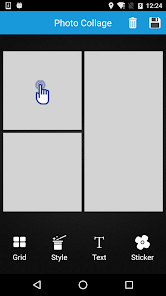
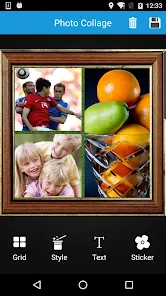
editor reviews
In the bustling digital age where memories are captured in pixels, finding the perfect tool to weave those moments into visual stories becomes essential. Enter Photo Collage Editor by MeiHillMan, a surprisingly robust application that transforms the simple act of combining photos into an art form. This app doesn't just slap pictures together; it provides a canvas for creativity, allowing users to move beyond basic grids and craft personalized collages that truly reflect their style. Its development seems focused on user empowerment, offering a depth of features typically found in more complex desktop software, all packaged within an intuitive mobile interface. For anyone who has ever felt limited by the preset templates of other apps, this editor feels like a breath of fresh, creative air.
The usage experience is notably smooth and engaging. From the moment you launch the app, you're greeted with a clean layout that invites exploration rather than overwhelming you. Navigating through the myriad of layout options, editing tools, and decorative elements feels intuitive. The real magic happens when you start dragging, resizing, and layering your photos; the app responds with fluid precision. Whether you're compiling vacation snapshots, creating a mood board for a project, or designing a unique social media post, the process feels less like a chore and more like a delightful creative session. The software strikes an impressive balance between offering professional-grade controls and maintaining approachable simplicity.
Choosing this software among a sea of similar options comes down to its unique blend of flexibility and flair. While many collage apps offer rigid templates, Photo Collage Editor provides dynamic frames, freeform editing, and a staggering library of stickers, backgrounds, and fonts that encourage originality. It doesn't force your memories into a bland, standardized box. Instead, it gives you the tools to build the box yourself, in any shape or color you desire. For users tired of cookie-cutter results and yearning for a tool that respects their creative vision, this is the standout choice. Ready to turn your photo gallery into a gallery of art? Don't wait—download Photo Collage Editor today and start crafting visuals that are uniquely yours! 🎨📲✨
features
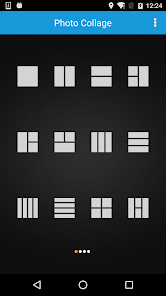
- 🎭 Dynamic Layout Engine: Go beyond basic grids with fully customizable frames. Adjust the size and shape of each individual cell, overlap photos, and create truly unique compositions with freeform placement tools.
- 🛠 Precision Editing Suite: Fine-tune every element. This includes robust photo editing for individual images within the collage, like filters, brightness, contrast, and saturation adjustments, ensuring each component looks its best.
- 💎 Vast Decorative Library: Access a huge, regularly updated collection of artistic assets. Find the perfect sticker, elegant text fonts, stylish backgrounds, and intricate clipart to add personality and thematic cohesion to your project.
- 🔗 Seamless Social Integration: Built for the sharing age. Once your masterpiece is complete, export it in high resolution and share it directly to all major social platforms like Instagram, Facebook, and Twitter without leaving the app.
- 📐 Professional Touch-Ups: Apply finishing touches that elevate your work. Add shadows, borders, and rounded corners to individual photos or the entire collage for a polished, professional look.
- 🔄 Non-Destructive Workflow: Experiment fearlessly. All edits are non-destructive, meaning you can revert changes, swap photos in frames, and adjust layers without starting over, preserving your original images.
- 🎯 Quick-Make Templates: For when inspiration needs a jumpstart. Browse through hundreds of beautifully designed pre-made templates for holidays, birthdays, announcements, and more, which you can fully customize.
- 🌈 Advanced Blending Modes: Unleash advanced creativity. Use layer blending modes to merge photos in artistic ways, creating double exposures and other complex visual effects directly within your collage.
- 💾 Flexible Export Options: Control your output. Save your creations in various formats and resolutions, optimizing for print quality, web use, or device wallpapers as needed.
- 🧩 Intuitive Layer Management: Easily handle complex projects. A straightforward layer panel lets you reorder, hide, or lock elements, making it simple to work on detailed collages with many components.
pros
- 🌟 Unmatched Creative Freedom: The level of control is exceptional. The freeform editing and customizable layouts mean you are never constrained by the app's design, allowing your personal style to shine through in every creation.
- 🚀 Smooth Performance: Despite its feature-rich environment, the app runs remarkably smoothly. Editing is lag-free, and even working with multiple high-resolution images doesn't cause frustrating crashes or slowdowns.
- 📚 Extensive Learning Resources: Help is always at hand. The app includes clear in-app tutorials, tooltips, and an active online community, making it easy for beginners to learn and for pros to discover advanced techniques.
- 🎨 Consistently Beautiful Results: The quality of the design elements is top-notch. Stickers, fonts, and filters are curated with a good aesthetic sense, which helps users produce collages that look professionally designed.
- 🆓 Generous Free Tier: You can achieve a lot without spending a penny. The free version offers a substantial array of layouts, basic edits, and decorations, making powerful collage editing accessible to everyone.
- 🔧 Regular, Meaningful Updates: The developers actively improve the app. New stickers, templates, and even requested features are added frequently, showing a commitment to user satisfaction and keeping the tool fresh.
- 👌 Incredibly User-Friendly: Complexity doesn't mean complication. The interface is logically organized, with tools placed right where you'd expect them, making the advanced feature set approachable for all skill levels.
cons
- ⚠️ Persistent Advertisements in Free Version: The free experience is interrupted by frequent full-screen video ads. While understandable for revenue, they can disrupt the creative flow and feel intrusive during the editing process.
- ⚠️ Premium Features Are Locked: Some of the most attractive assets and advanced tools, like certain premium stickers, fonts, and export resolutions, require a subscription or one-time purchase, which might deter some users.
- ⚠️ Occasional Overwhelm for New Users: The sheer number of options, while a strength, can initially be daunting. A new user might need some time to explore and understand where everything is located within the menus.
Recommended Apps
![]()
Emoji Home: Make Messages Fun
Emoji Home4.5

![]()
Planner 5D: Home Design, Decor
Planner 5D3.8![]()
Live Wallpaper- 4k Backgrounds
DEHA4.6![]()
Love Horoscopes
Horoscope TV4.2![]()
Fake video call - Prank call
HiddenScreen.NET0![]()
Fake call - prank
GameAndro4.5![]()
Wednesday Addams Prank Call
Prank Calling4![]()
Grindr - Gay Dating & Chat
Grindr LLC4.1![]()
GhostTube SLS Camera Alternate
GhostTube4![]()
Photo Blender: Picture Mixer
VysionApps4.1![]()
Make Me Bald Prank
AppTornado2.5![]()
GPS Navigation Maps Directions
SaaAneeDroid4.2![]()
Daily Horoscope
Horoscope by Comitic4.8![]()
Face Swap Gender Swap&Changer
Energy apps2.8![]()
The Pattern Astrology
Pattern Home, Inc.3.9












Hot Apps
-
![]()
Chai: Chat AI Platform
Chai Research Corp.4.4 -
![]()
Geeni
Merkury Innovations4.6 -
![]()
Snapchat
Snap Inc4.1 -
![]()
Netflix
Netflix, Inc.3.9 -
![]()
Sora by OpenAI
OpenAI4.7 -
![]()
Amazon Alexa
Amazon Mobile LLC4.5 -
![]()
Venmo
PayPal, Inc.4.2 -
![]()
ParkMobile: Park. Pay. Go.
Parkmobile, LLC4.7 -
![]()
Afterpay - Buy Now Pay Later
Afterpay3.8 -
![]()
letgo: Buy & Sell Used Stuff
letgo3.3 -
![]()
Uber - Request a ride
Uber Technologies, Inc.4.6 -
![]()
Google Chat
Google LLC4.4 -
![]()
MyFitnessPal: Calorie Counter
MyFitnessPal, Inc.4.3 -
![]()
Passport Parking
Passport Labs, Inc.3.4 -
![]()
DeepSeek - AI Assistant
DeepSeek4.2 -
![]()
Domino's Pizza USA
Domino's Pizza LLC4.7 -
![]()
Direct Express®
i2c Inc.4.3 -
![]()
Microsoft Copilot
Microsoft Corporation4.8 -
![]()
Wise: International Transfers
Wise Payments Ltd.4.7 -
![]()
ChatOn - AI Chat Bot Assistant
AIBY Inc.4.4 -
![]()
Google Pay
Google LLC4.4 -
![]()
ChatBot - AI Chat
X PhotoKit4.5 -
![]()
Bolt: Request a Ride
Bolt Technology4.8 -
![]()
Amazon Fire TV
Amazon Mobile LLC4.1 -
![]()
Google Home
Google LLC4.2 -
![]()
Hulu: Stream TV shows & movies
Disney4.5 -
![]()
Facebook
Meta Platforms, Inc.4 -
![]()
Affirm: Buy now, pay over time
Affirm, Inc4.7 -
![]()
CapCut - Video Editor
Bytedance Pte. Ltd.4 -
![]()
YouTube
Google LLC4.1






























Disclaimer
1.Appinfocenter does not represent any developer, nor is it the developer of any App or game.
2.Appinfocenter provide custom reviews of Apps written by our own reviewers, and detailed information of these Apps, such as developer contacts, ratings and screenshots.
3. All trademarks, registered trademarks, product names and company names or logos appearing on the site are the property of their respective owners.
4.Appinfocenter abides by the federal Digital Millennium Copyright Act (DMCA) by responding to notices of alleged infringement that complies with the DMCA and other applicable laws.
5.If you are the owner or copyright representative and want to delete your information, please contact us [email protected].
6.All the information on this website is strictly observed all the terms and conditions of Google Ads Advertising policies and Google Unwanted Software policy.
7.Appinfocenter.com is an independent, information-only website which is 100% free to all the users.