Step Counter - Pedometer

10M+
Installs
Hitchhike Tech
Developer
-
Health & Fitness
Category
-
Rated for 3+
Content Rating
-
https://inston.ltd/privacypolicy.html?pkg=stepcounter.pedometer.stepstracker
Privacy Policy
editor reviews
In a world increasingly focused on health and wellness, finding a simple yet effective way to track daily activity has become a priority for many. Step Counter - Pedometer by Hitchhike Tech emerges as a straightforward solution in a crowded market of fitness apps. This app strips away the complexity often associated with health tracking, offering a no-fuss, dedicated tool for counting your steps. Its development philosophy seems centered on accessibility and ease of use, making it an ideal choice for anyone who wants to start a basic fitness journey without being overwhelmed by data, social features, or subscription fees. The usage experience is refreshingly simple: install, grant necessary permissions, and it starts working in the background with minimal battery impact. For those seeking a pure pedometer without the bloat, this app hits the mark perfectly. 🚶♂️📱💡🏃♀️✨🎯🔄🌱📊✅
Choosing this particular pedometer among a sea of alternatives comes down to its core promise: doing one thing very well. While other apps bundle step counting with calorie calculators, diet plans, and social networks, Hitchhike Tech's offering remains gloriously singular in purpose. It provides the fundamental metric of daily movement without distractions. The interface is clean, intuitive, and gets out of your way, presenting your step count, distance, and an estimate of calories burned in a clear, glanceable format. This focused approach means the app is lightweight, reliable, and doesn't nag you with unnecessary notifications or upsells. It respects your phone's resources and your attention, making it a dependable digital companion for your walks, whether they're a quick trip to the mailbox or a dedicated hour-long stroll. 🆚🛡️🧭🧘♂️🏞️👟📈🔋🧩🤝
The overall experience feels reliable and unintrusive. The step counting mechanism, leveraging your phone's built-in sensors, is accurate for daily tracking purposes, providing a consistent benchmark for your activity. It helps build a tangible habit by making you aware of your movement patterns throughout the day. Watching your step count climb can be a surprisingly powerful motivator to take the stairs, park farther away, or enjoy an evening walk. For anyone looking to incorporate more movement into a sedentary lifestyle, this app serves as an excellent, pressure-free starting point. It turns an abstract health goal into a simple, daily number to meet or exceed. Ready to take the first step toward a more active life? Download Step Counter - Pedometer today and let your journey begin, one step at a time! 🎉📥👣🌅🏆🧠🔥🌟💪
features
- 🎯 Automatic Tracking: Once you open the app and grant the required activity permission, it begins counting your steps automatically in the background. There's no need to press a start or stop button for daily use; it seamlessly integrates into your routine, working quietly as you go about your day.
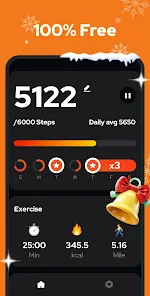
- 📊 Clear Data Dashboard: The main screen presents all your vital stats in a clean, easy-to-read layout. You can see your current step count, the distance covered (in miles or kilometers), and an estimated number of calories burned, giving you a quick snapshot of your daily progress.
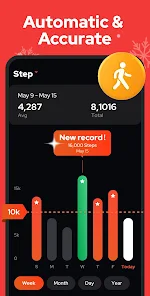
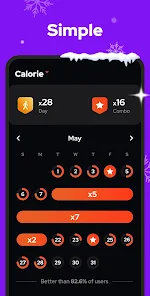
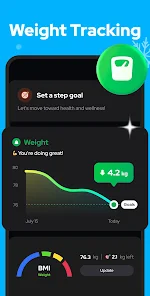
- 📈 Historical Progress Charts: The app includes a calendar view and simple charts that allow you to review your step history over previous days, weeks, or months. This visual representation helps you identify trends, spot active or inactive periods, and stay motivated by seeing your consistency.
- ⚙️ Customizable Goals: You are not stuck with a generic 10,000-step target. The app lets you personalize your daily step goal to match your fitness level and aspirations, whether you're aiming for 5,000 steps or challenging yourself with 20,000.
- 🔔 Smart Reminders: To help you stay on track, you can set up friendly, non-intrusive notifications. These reminders can nudge you if you've been inactive for a while or congratulate you when you reach your daily goal, providing a little extra encouragement.
- 🌙 Dark Mode Support: The app offers a dark theme option, which is easier on the eyes, especially during nighttime use. This feature also helps conserve battery life on devices with OLED screens, aligning with the app's efficient design.
- 🔄 Data Synchronization: Your step data can sync with Google Fit, allowing you to consolidate your health metrics in one place if you use other fitness apps or devices. This interoperability adds value without complicating the core app experience.
- 📱 Minimal Battery Drain: Designed to be resource-efficient, the app uses your phone's built-in motion sensors intelligently to minimize its impact on battery life. You can track your steps all day without worrying about your phone dying by the afternoon.
- 🎨 Simple & Intuitive Interface: With a user-centric design, the app avoids clutter and complex menus. Everything you need is accessible within a tap or two, making it suitable for users of all ages and tech-savviness levels.
- 🆓 Completely Free (No Ads): Remarkably, the core step-counting functionality is offered without any cost, advertisements, or hidden subscriptions. This commitment to a free, clean experience is a significant part of its appeal.
pros
- ✨ Effortless Operation: The 'set it and forget it' nature of the app is its biggest strength. You don't need to manage it actively; it just works in the background, providing hassle-free tracking from the moment you wake up until you go to sleep.
- 🧠 Focus on Core Function: By concentrating solely on being an excellent pedometer, the app delivers exceptional reliability and simplicity. It doesn't try to be a jack-of-all-trades, which often leads to master-of-none syndrome in other health apps.
- 📉 Lightweight and Fast: The app has a small footprint on your device. It installs quickly, launches instantly, and operates smoothly without lag, even on older smartphone models, thanks to its optimized code.
- 🔒 Privacy-Conscious: Unlike many fitness platforms that collect extensive personal data, this pedometer keeps things local and private. Your step data primarily stays on your device, with cloud sync being an optional feature for Google Fit users.
- 💡 Effective Motivation Tool: Seeing your step count as a tangible number provides immediate feedback and a sense of accomplishment. The simple act of tracking can unconsciously encourage you to move more, fostering healthier habits over time.
- 🌍 Universal Accessibility: Its straightforward design and free price point make it accessible to a vast global audience. Anyone with a smartphone can use it to start monitoring their activity, regardless of their budget or fitness knowledge.
cons
- 📵 Limited Advanced Metrics: For fitness enthusiasts seeking detailed insights like heart rate correlation, workout detection, or sleep analysis, this app will feel too basic. It's strictly a step, distance, and calorie estimator.
- 📱 Device Sensor Dependency: The accuracy is entirely dependent on the quality of your phone's motion sensors and how you carry your phone (e.g., in a bag vs. pocket). It may not be as precise as a dedicated fitness band or smartwatch.
- 🔄 Passive Tracking Only: The app lacks an active workout or exercise mode. If you go for a run or bike ride, it won't categorize that activity separately or provide pace/speed data; it simply continues counting steps.
- 👥 No Social or Community Features: If you thrive on competition, sharing achievements with friends, or participating in group challenges, you'll find this app isolating. It's a purely personal, solitary tracking tool.
- ⚡ Potential Background Restrictions: On some Android versions, battery optimization settings can sometimes pause the app's background activity. Users may need to manually adjust settings to ensure uninterrupted all-day tracking.
- 🎨 Design Could Be More Modern: While functional, the visual design and animations are somewhat utilitarian. Users accustomed to sleek, polished interfaces from major tech companies might find the aesthetics a bit dated.
Articles
![]()
How to Get Robux Safely Without Scams
![]()
How to Download Older Versions of Android Apps
![]()
How to Download Games on Google Play for the First Time
![]()
What Is an APK File for Android? Everything You Need to Know
![]()
Do Free Robux Generators Work?
![]()
Robux Pricing Guide (2026 Update): How Much Robux Really Costs
![]()
How to Avoid Scams in Roblox
![]()
Rarest Pets in Adopt Me! (2026 Update)
![]()
How to Trade Safely in Adopt Me! (So You Don't Lose Everything)
![]()
Secret Tricks Nobody Tells You in 'Steal a Brainrot'
![]()
Beginner Guide: Don't Lose Your Brainrot
![]()
How to Steal in 'Steal a Brainrot' Without Getting Caught (Or at Least Not Instantly)
![]()
Is Brookhaven RP Worth Playing? It Depends on What You’re Looking For
![]()
Why Blox Fruits Is So Popular? Here’s Why Everyone Keeps Playing It
![]()
Best Roblox Obby Games for Beginners (2026): Learn the Game Without Hitting a Wall
![]()
Top 10 Roblox Horror Games (2026): The Scariest Experiences You Can't Miss
















Hot Apps
-
![]()
PayPal - Send, Shop, Manage
PayPal Mobile4.3
-
![]()
TikTok
TikTok Pte. Ltd.4.4 -
![]()
ChatOn - AI Chat Bot Assistant
AIBY Inc.4.4 -
![]()
Venmo
PayPal, Inc.4.2 -
![]()
Affirm: Buy now, pay over time
Affirm, Inc4.7
-
![]()
letgo: Buy & Sell Used Stuff
letgo3.3 -
![]()
Netflix
Netflix, Inc.3.9 -
![]()
FaceApp: Perfect Face Editor
FaceApp Technology Ltd4.4 -
![]()
Klarna | Shop now. Pay later.
Klarna Bank AB (publ)4.3 -
![]()
Sora by OpenAI
OpenAI4.7 -
![]()
Google Gemini
Google LLC4.6 -
![]()
YouTube
Google LLC4.1 -
![]()
Google Pay
Google LLC4.4 -
![]()
Microsoft Copilot
Microsoft Corporation4.8 -
![]()
Amazon Alexa
Amazon Mobile LLC4.5 -
![]()
Telegram
Telegram FZ-LLC4.2 -
![]()
GroupMe
GroupMe4.5 -
![]()
SiriusXM: Music, Sports & News
SiriusXM4.6 -
![]()
Chai: Chat AI Platform
Chai Research Corp.4.4 -
![]()
Uber - Request a ride
Uber Technologies, Inc.4.6 -
![]()
CapCut - Video Editor
Bytedance Pte. Ltd.4 -
![]()
Ticketmaster-Buy, Sell Tickets
Ticketmaster L.L.C.3 -
![]()
Pandora - Music & Podcasts
Pandora4.1 -
![]()
Domino's Pizza USA
Domino's Pizza LLC4.7 -
![]()
Duolingo: Language & Chess
Duolingo4.7 -
![]()
Direct Express®
i2c Inc.4.3 -
![]()
Uber Eats: Food Delivery
Uber Technologies, Inc.4.3 -
![]()
Hulu: Stream TV shows & movies
Disney4.5 -
![]()
Microsoft Teams
Microsoft Corporation4.6 -
![]()
GasBuddy: Find & Pay for Gas
PDI Software, Inc.3.1






























Disclaimer
1.Appinfocenter does not represent any developer, nor is it the developer of any App or game.
2.Appinfocenter provide custom reviews of Apps written by our own reviewers, and detailed information of these Apps, such as developer contacts, ratings and screenshots.
3. All trademarks, registered trademarks, product names and company names or logos appearing on the site are the property of their respective owners.
4.Appinfocenter abides by the federal Digital Millennium Copyright Act (DMCA) by responding to notices of alleged infringement that complies with the DMCA and other applicable laws.
5.If you are the owner or copyright representative and want to delete your information, please contact us [email protected].
6.All the information on this website is strictly observed all the terms and conditions of Google Ads Advertising policies and Google Unwanted Software policy.
7.Appinfocenter.com is an independent, information-only website which is 100% free to all the users.