Voice Recorder

10,000,000+
Installs
quality apps (recorder, weather, music)
Developer
-
Entertainment
Category
-
Rated for 3+
Content Rating
-
https://sites.google.com/view/voicerecorderpivacy
Privacy Policy
editor reviews
In the bustling digital marketplace, finding a straightforward, reliable audio capture tool can feel like searching for a needle in a haystack. 🎯 Enter the Voice Recorder app from Quality Apps, a developer known for its suite of practical utilities. This app cuts through the noise with a singular focus: providing a clean, efficient, and powerful recording experience right on your mobile device. 🎙️ It's designed for anyone from students capturing lectures and journalists conducting interviews to musicians sketching melodies or professionals saving meeting notes. The interface is refreshingly intuitive, stripping away unnecessary complexity to put essential recording functions front and center. 🚀 You're not bogged down by a steep learning curve; you simply open the app and start capturing sound with remarkable clarity. This commitment to core functionality over flashy gimmicks is what makes it stand tall in a sea of similar applications. 🏆
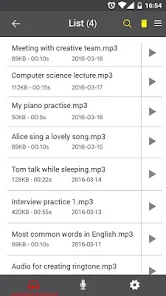
The development philosophy behind this Voice Recorder is clearly user-centric. Quality Apps has honed its craft across various utility applications, and that expertise shines here. 🛠️ The app feels polished and stable, with consistent updates that often focus on improving audio fidelity and storage management rather than just adding bloat. The usage experience is seamless; recordings are organized in a logical list view, making it easy to find, play, rename, or share your audio files. 🔊 The sound quality is impressive for a standard app, effectively minimizing background hiss and capturing voices with good definition. Whether you're using a high-end smartphone or a more modest device, the performance remains consistently solid, ensuring your important audio is preserved faithfully. 📈
Choosing this particular voice recorder among its peers comes down to its elegant balance of simplicity and capability. 🥇 Many competitors are either overly basic, lacking crucial features like format options or cloud backup, or are overwhelmingly complex, packed with professional editing suites that the average user never touches. This app finds the sweet spot. It offers advanced features like recording in lossless WAV format or adjustable gain control, but tucks them neatly away in settings for when you need them. 🧰 Its reliability is a major selling point; it rarely crashes or corrupts files, which is paramount for an app handling potentially irreplaceable audio. For a tool that needs to work perfectly in the moment, this dependability is golden. ⭐ If you need a trustworthy, no-nonsense companion to capture life's conversations, ideas, and moments in crystal-clear audio, your search ends here. Don't wait for a missed opportunity—download Voice Recorder by Quality Apps today and never lose a word. 📲
features
- 🎤 Crystal-Clear Audio Capture: The app utilizes high-quality encoding to ensure your recordings are sharp and intelligible. It effectively handles different environments, from quiet rooms to slightly noisier settings, producing clean audio files perfect for playback and transcription.
- 📁 Smart File Management: All your recordings are automatically saved and neatly listed in chronological order. You can easily rename files, add notes for context, and organize them without ever leaving the app, making retrieval a breeze.
- ⚙️ Flexible Recording Settings: Dive into the settings to customize your experience. Choose between space-saving MP3 and high-fidelity WAV formats, adjust the microphone sensitivity or gain, and even set a recording timer for hands-free operation.
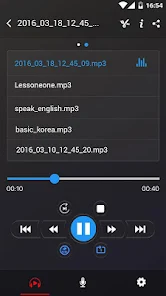
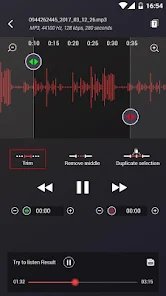
- 🔍 Instant Playback & Editing: Tap any recording to play it back immediately. The built-in player includes essential controls like skip forward/backward and a variable speed playback feature. You can also trim recordings directly within the app to remove unwanted silences or mistakes.
- ☁️ Seamless Sharing & Backup: Sharing your audio is incredibly straightforward. Export files via email, messaging apps, or directly to cloud storage services like Google Drive or Dropbox. This facilitates easy collaboration and creates a vital backup of your important recordings.
- 🔕 Background Recording Stability: The app continues recording reliably even when you switch to another app or lock your phone screen. This is essential for long lectures or interviews, ensuring you don't miss a single moment due to technical hiccups.
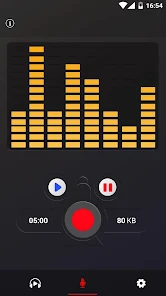
- 🎨 Minimalist & Intuitive Interface: The design prioritizes usability. A large, prominent record button dominates the simple home screen, with other options accessible through clear icons. This clutter-free approach reduces friction and lets you start recording in seconds.
- ⏱️ Recording Timer & Skip Silence: For extended sessions, you can set a timer to stop recording automatically. A handy "skip silence" feature can also be enabled, which temporarily pauses recording during quiet periods to save file space and editing time later.
- 🔒 Password Protection (Optional): For sensitive recordings, the app offers an optional security layer. You can lock the entire app or specific files with a PIN or password, keeping your private conversations confidential.
- 📊 Visual Sound Wave Display: During both recording and playback, a dynamic sound wave visualization is shown. This provides immediate visual feedback on audio levels, helping you monitor the recording's volume and activity at a glance.
pros
- 🌟 Remarkable Reliability: The app is exceptionally stable. It rarely, if ever, crashes during recording or playback, which is the most critical factor for an app tasked with capturing potentially once-in-a-lifetime audio moments.
- 💎 Superior Sound Quality: For a free app, the audio output is consistently clear and detailed. It does an excellent job of focusing on the primary sound source while suppressing a significant amount of ambient noise and distortion.
- 🚀 Instant Launch and Operation: From tapping the icon to starting a recording, the process is nearly instantaneous. There's no lag, no splash screen delays, and no unnecessary permissions demanded upfront—just pure, fast utility.
- 🧩 Thoughtful Feature Set: It includes almost every feature a casual or semi-pro user could want—format choices, trimming, sharing, cloud backup—without feeling bloated. Each feature feels purposeful and well-integrated into the core workflow.
- 📱 Optimized for All Devices: The app performs smoothly across a wide range of Android devices. It doesn't drain the battery excessively during long recordings and manages system resources intelligently.
- 🆓 Truly Free Core Experience: Unlike many competitors, all the essential recording and management features are completely free to use. There are no intrusive ads plastered over the main interface, creating an uninterrupted user experience.
cons
- ⚠️ Limited Advanced Editing: While basic trimming is available, the app lacks more sophisticated audio editing tools. You cannot merge multiple recordings, apply sound filters, or perform multi-track editing within the app itself.
- 📶 Cloud Sync Not Automatic: Although you can manually export to cloud services, the app does not offer automatic, continuous background syncing of your recordings to a cloud account. This requires a manual step for backup.
- 🎵 Basic Playback Equalizer: The playback audio controls are somewhat basic. There is no graphic equalizer or bass/treble adjustments to enhance listening, which might be a minor drawback for audio enthusiasts reviewing their recordings.
- 🌐 No Direct Transcription Service: The app focuses solely on recording and management. It does not integrate any AI-powered speech-to-text transcription services, which are becoming a popular feature in some newer recording apps.
- 🛒 Premium Features Behind Paywall: Some advanced features, like the password protection or perhaps removing a small watermark on shared files, may be locked behind a one-time purchase or subscription, which isn't immediately clear upon first download.
- 📞 Call Recording Not Supported: Depending on your region and device, the app does not support the recording of phone calls. This is a legal and technical limitation, but it's a feature some users actively seek in a recorder app.
Articles
![]()
How to Get Robux Safely Without Scams
![]()
How to Download Older Versions of Android Apps
![]()
How to Download Games on Google Play for the First Time
![]()
What Is an APK File for Android? Everything You Need to Know
![]()
Do Free Robux Generators Work?
![]()
Robux Pricing Guide (2026 Update): How Much Robux Really Costs
![]()
How to Avoid Scams in Roblox
![]()
Rarest Pets in Adopt Me! (2026 Update)
![]()
How to Trade Safely in Adopt Me! (So You Don't Lose Everything)
![]()
Secret Tricks Nobody Tells You in 'Steal a Brainrot'
![]()
Beginner Guide: Don't Lose Your Brainrot
![]()
How to Steal in 'Steal a Brainrot' Without Getting Caught (Or at Least Not Instantly)
![]()
Is Brookhaven RP Worth Playing? It Depends on What You’re Looking For
![]()
Why Blox Fruits Is So Popular? Here’s Why Everyone Keeps Playing It
![]()
Best Roblox Obby Games for Beginners (2026): Learn the Game Without Hitting a Wall
![]()
Top 10 Roblox Horror Games (2026): The Scariest Experiences You Can't Miss
















Hot Apps
-
![]()
Google Chrome: Fast & Secure
Google LLC4.1
-
![]()
PolyBuzz: Chat with AI Friends
CLOUD WHALE INTERACTIVE TECHNOLOGY LLC.3.8
-
![]()
MyFitnessPal: Calorie Counter
MyFitnessPal, Inc.4.3 -
![]()
Hulu: Stream TV shows & movies
Disney4.5 -
![]()
Pinterest
Pinterest4.5 -
![]()
Klarna | Shop now. Pay later.
Klarna Bank AB (publ)4.3 -
![]()
ParkMobile: Park. Pay. Go.
Parkmobile, LLC4.3 -
![]()
Amazon Alexa
Amazon Mobile LLC4.5 -
![]()
OfferUp: Buy. Sell. Letgo.
OfferUp Inc.4.4 -
![]()
Chai: Chat AI Platform
Chai Research Corp.4.4 -
![]()
YouTube
Google LLC4.1 -
![]()
GroupMe
GroupMe4.5 -
![]()
TikTok
TikTok Pte. Ltd.4.4 -
![]()
Afterpay - Buy Now Pay Later
Afterpay3.8 -
![]()
PayByPhone
PayByPhone Technologies Inc .4.9 -
![]()
Spotify: Music and Podcasts
Spotify AB4.3 -
![]()
Signal Private Messenger
Signal Foundation4.5 -
![]()
Amazon Fire TV
Amazon Mobile LLC4.1 -
![]()
Sora by OpenAI
OpenAI4.7 -
![]()
Wise: International Transfers
Wise Payments Ltd.4.7 -
![]()
Snapmint: Buy Now, Pay in EMIs
Snapmint4.5 -
![]()
Bolt: Request a Ride
Bolt Technology4.8 -
![]()
Uber - Request a ride
Uber Technologies, Inc.4.6 -
![]()
Passport Parking
Passport Labs, Inc.2.5 -
![]()
GasBuddy: Find & Pay for Gas
PDI Software, Inc.3.1 -
![]()
Perplexity - Ask Anything
PerplexityAI4.7 -
![]()
ChatOn - AI Chat Bot Assistant
AIBY Inc.4.4 -
![]()
Netflix
Netflix, Inc.3.9 -
![]()
Google Chat
Google LLC4.4 -
![]()
Instagram
Instagram4.3






























Disclaimer
1.Appinfocenter does not represent any developer, nor is it the developer of any App or game.
2.Appinfocenter provide custom reviews of Apps written by our own reviewers, and detailed information of these Apps, such as developer contacts, ratings and screenshots.
3. All trademarks, registered trademarks, product names and company names or logos appearing on the site are the property of their respective owners.
4.Appinfocenter abides by the federal Digital Millennium Copyright Act (DMCA) by responding to notices of alleged infringement that complies with the DMCA and other applicable laws.
5.If you are the owner or copyright representative and want to delete your information, please contact us [email protected].
6.All the information on this website is strictly observed all the terms and conditions of Google Ads Advertising policies and Google Unwanted Software policy.
7.Appinfocenter.com is an independent, information-only website which is 100% free to all the users.