Link to Windows

1,000,000,000+
Installs
Microsoft Corporation
Developer
-
Productivity
Category
-
Rated for 3+
Content Rating
-
http://go.microsoft.com/fwlink/?LinkID=248686
Privacy Policy
editor reviews
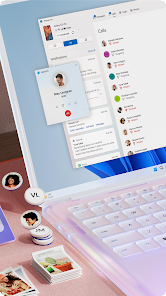
In an era where our smartphones and computers often feel like separate worlds, Microsoft's Link to Windows emerges as a powerful bridge, seamlessly connecting your Android life to your Windows PC. This isn't just another file transfer tool; it's a deeply integrated experience that makes your devices feel like extensions of each other. The development journey reflects Microsoft's commitment to its ecosystem, evolving from the basic "Your Phone" app into a feature-rich platform that genuinely enhances productivity and reduces digital friction. The usage experience is remarkably smooth, transforming your PC into a command center for your mobile notifications, messages, photos, and even apps.
Choosing Link to Windows over similar software like third-party push services or manufacturer-specific solutions comes down to its native integration and zero-cost value. While other apps might offer a single function, Link to Windows bundles phone calls, SMS, notifications, photo management, and app mirroring into one cohesive, secure package. It leverages the existing trust and security framework of your Microsoft account, avoiding the need for additional logins or questionable data routing through third-party servers. The experience feels less like running separate software and more like unlocking a hidden feature of Windows itself, designed specifically for the vast population using Android alongside their Microsoft-powered computers.
The setup is refreshingly straightforward, and once connected, the convenience is immediately apparent. You can drag and drop photos between devices, respond to texts without ever touching your phone, and continue browsing web pages you had open on your mobile. It eliminates the constant context-switching that drains focus, letting you stay in your workflow. For anyone who uses both an Android phone and a Windows PC, this app is a game-changer that feels essential once you've tried it. Stop juggling devices and start integrating them. Download Link to Windows today and experience a truly connected digital life! 📱💻🔄🌉🚀✨🤝🎯📥🌟
features
- 📱 Phone Screen Mirroring: Run your favorite Android apps directly on your Windows desktop. You can interact with them using your PC's mouse, keyboard, or touchscreen, making it perfect for using mobile-only apps or playing games on a larger display.
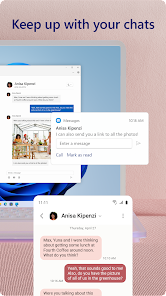
- ✉️ Cross-Device Messaging: Send and receive SMS text messages right from your PC. The app syncs your message history and allows you to type replies using your full-sized keyboard, keeping your phone tucked away during work or study sessions.
- 🖼️ Instant Photo Access & Transfer: Your recent photos automatically appear in the app. You can view, copy, or save them to your PC with a simple drag-and-drop, making it incredibly fast to move pictures from your phone to your computer for editing or sharing.
- 🔔 Unified Notification Center: See and manage all your phone's notifications on your PC. You can dismiss them, interact with them, and never miss an important alert even when your phone is on silent or charging in another room.
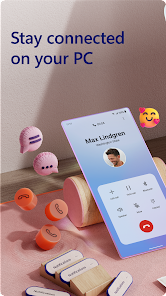
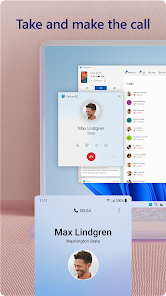
- 📞 Phone Call Management: Answer or decline incoming calls directly from your computer if your phone is nearby. You can even make calls by clicking on phone numbers found in web pages or documents on your PC.
- 🌐 Web Page Continuity: Seamlessly transfer your browsing session from your phone to your PC. If you're reading an article on your mobile browser, you can instantly open it on Microsoft Edge on your desktop with a single click.
- ⚡ Quick Settings Control: Toggle essential phone settings like Bluetooth, Wi-Fi, and "Do Not Disturb" mode directly from the Link to Windows panel on your computer, saving you the need to pick up your device.
pros
- 🎯 Flawless Ecosystem Integration: The app feels like a natural part of Windows, with a clean interface that matches the OS aesthetics. It uses your Microsoft account for a secure, password-free link, making the connection process effortless and trustworthy.
- 🚀 Remarkable Performance & Stability: The connection is generally fast and reliable, with low latency for app mirroring and instant syncing for notifications and photos. It maintains a stable link without significant battery drain on your phone.
- 💰 Completely Free of Charge: Unlike many premium connectivity tools, Link to Windows offers all its powerful features at no cost. There are no subscriptions, in-app purchases, or feature tiers to worry about.
- 🔒 Strong Security Foundation: Data is encrypted during transfer, and the connection is established directly between your devices using Microsoft's secure infrastructure. Your messages and notifications don't get stored on random cloud servers.
- 🧩 Minimal Setup Hassle: Getting started is a breeze. You just need the app on your phone, the 'Phone Link' feature on Windows 10/11, and to scan a QR code. No complicated network configurations or manual IP address entries are required.
cons
- 📶 Device Compatibility Limitations: The experience is best and fully featured only with recent Samsung Galaxy phones and select Surface devices. Users with other Android brands may find certain advanced features, like full app mirroring, unavailable or restricted.
- 🔋 Occasional Connection Drops: While usually stable, the wireless connection can sometimes drop, especially on crowded Wi-Fi networks or when the PC resumes from sleep. Reconnecting is easy but can interrupt your workflow.
- 📱 Dependent on Phone's State: The app requires your phone to be powered on, unlocked, and connected to the same network as your PC. If your phone's battery dies or it loses Wi-Fi, the link is immediately broken.
- 🔄 Feature Parity Gaps: The iOS version (for iPhones) is significantly more limited, offering only basic photo and web page sharing. This creates an uneven experience within the Microsoft ecosystem itself.
- ⚙️ Minor Interface Quirks: Some users might find the notification panel or the photo gallery within the app to be less polished or customizable compared to dedicated third-party alternatives designed for specific tasks.
Articles
![]()
How to Get Robux Safely Without Scams
![]()
How to Download Older Versions of Android Apps
![]()
How to Download Games on Google Play for the First Time
![]()
What Is an APK File for Android? Everything You Need to Know
![]()
Do Free Robux Generators Work?
![]()
Robux Pricing Guide (2026 Update): How Much Robux Really Costs
![]()
How to Avoid Scams in Roblox
![]()
Rarest Pets in Adopt Me! (2026 Update)
![]()
How to Trade Safely in Adopt Me! (So You Don't Lose Everything)
![]()
Secret Tricks Nobody Tells You in 'Steal a Brainrot'
![]()
Beginner Guide: Don't Lose Your Brainrot
![]()
How to Steal in 'Steal a Brainrot' Without Getting Caught (Or at Least Not Instantly)
![]()
Is Brookhaven RP Worth Playing? It Depends on What You’re Looking For
![]()
Why Blox Fruits Is So Popular? Here’s Why Everyone Keeps Playing It
![]()
Best Roblox Obby Games for Beginners (2026): Learn the Game Without Hitting a Wall
![]()
Top 10 Roblox Horror Games (2026): The Scariest Experiences You Can't Miss
















Hot Apps
-
![]()
Affirm: Buy now, pay over time
Affirm, Inc4.7

-
![]()
Pinterest
Pinterest4.5 -
![]()
Uber Eats: Food Delivery
Uber Technologies, Inc.4.3 -
![]()
Google Chrome: Fast & Secure
Google LLC4.1 -
![]()
Google Gemini
Google LLC4.6 -
![]()
Ticketmaster-Buy, Sell Tickets
Ticketmaster L.L.C.3 -
![]()
Zoom - One Platform to Connect
zoom.us4.1 -
![]()
ChatOn - AI Chat Bot Assistant
AIBY Inc.4.4 -
![]()
DeepSeek - AI Assistant
DeepSeek4.2 -
![]()
Snapchat
Snap Inc4.1 -
![]()
Ford™
Ford Motor Co.4.7 -
![]()
Microsoft Teams
Microsoft Corporation4.6 -
![]()
Passport Parking
Passport Labs, Inc.2.5 -
![]()
Google Pay
Google LLC4.4 -
![]()
Amazon Fire TV
Amazon Mobile LLC4.1 -
![]()
PolyBuzz: Chat with AI Friends
CLOUD WHALE INTERACTIVE TECHNOLOGY LLC.3.8 -
![]()
Pandora - Music & Podcasts
Pandora4.1 -
![]()
Venmo
PayPal, Inc.4.2 -
![]()
Google Chat
Google LLC4.4 -
![]()
Sora by OpenAI
OpenAI4.7 -
![]()
TikTok
TikTok Pte. Ltd.4.4 -
![]()
Cash App
Block, Inc.4.5 -
![]()
MyFitnessPal: Calorie Counter
MyFitnessPal, Inc.4.3 -
![]()
Google Home
Google LLC4.2 -
![]()
Grok
xAI4.9 -
![]()
Geeni
Merkury Innovations4.6 -
![]()
YouTube
Google LLC4.1 -
![]()
Klarna | Shop now. Pay later.
Klarna Bank AB (publ)4.3 -
![]()
CapCut - Video Editor
Bytedance Pte. Ltd.4 -
![]()
Duolingo: Language & Chess
Duolingo4.7






























Disclaimer
1.Appinfocenter does not represent any developer, nor is it the developer of any App or game.
2.Appinfocenter provide custom reviews of Apps written by our own reviewers, and detailed information of these Apps, such as developer contacts, ratings and screenshots.
3. All trademarks, registered trademarks, product names and company names or logos appearing on the site are the property of their respective owners.
4.Appinfocenter abides by the federal Digital Millennium Copyright Act (DMCA) by responding to notices of alleged infringement that complies with the DMCA and other applicable laws.
5.If you are the owner or copyright representative and want to delete your information, please contact us [email protected].
6.All the information on this website is strictly observed all the terms and conditions of Google Ads Advertising policies and Google Unwanted Software policy.
7.Appinfocenter.com is an independent, information-only website which is 100% free to all the users.