
OP Auto Clicker - Auto Tap

1M+
Installs
mouse tool
Developer
-
Productivity
Category
-
Rated for 3+
Content Rating
-
https://opautoclicker.com/privacy-policy/
Privacy Policy
Screenshots
editor reviews
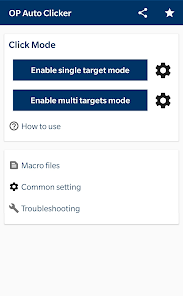
OP Auto Clicker - Auto Tap is a robust and easy-to-use automation tool developed by Mouse Tool that has quickly gained popularity among users who need to automate repetitive tapping or clicking tasks on their Android devices. Whether you're playing mobile games that require constant tapping or managing tasks that need frequent screen interactions, this app provides a reliable solution. It offers several useful features, including adjustable tap speed, customized intervals, and multiple click points, all designed to save you time and effort.The app's interface is intuitive, making it accessible to both beginners and experienced users. You can quickly set up the automation parameters and start the auto-clicking process without a steep learning curve. Its lightweight nature ensures that it doesn't consume excessive system resources, allowing your device to run smoothly even with ongoing automation. For those wondering why they should choose OP Auto Clicker over other similar apps, the answer lies in its simplicity, customizability, and no-frills approach. Unlike some alternatives that offer complex features that might overwhelm users, OP Auto Clicker delivers just what is needed for efficient auto-tapping, without unnecessary complications. It's a great choice for anyone looking to automate tasks efficiently on their Android devices. Download OP Auto Clicker - Auto Tap today and make your device work smarter, not harder! 📲💥🚀⏳💡⚡💯🔥🔧📱✨
features
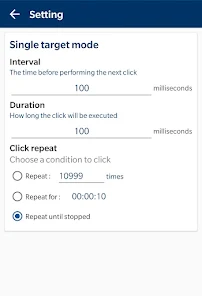
- ⏱️ Fast & Customizable Tapping: The app allows you to adjust the tap speed to match your specific needs, whether it's a slow or rapid click. This feature ensures that it works well for a variety of tasks like gaming, productivity apps, or testing. 📊🔄
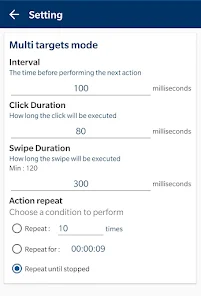
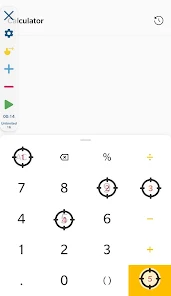
- 💻 Multiple Click Points: OP Auto Clicker enables you to set multiple tap points on the screen, allowing you to automate complex actions that require tapping different spots simultaneously or in a sequence. This versatility is perfect for games or applications with multiple interactive areas. 🖱️🎮
- 🔧 Easy-to-Use Interface: The app's straightforward user interface ensures that even novice users can quickly set it up and start automating tasks without any hassle. The simplicity of the design enhances its overall usability. 🖥️📲
- 🧑💻 No Root Required: OP Auto Clicker doesn't require root access, making it a safer and more accessible option for users who prefer not to modify their devices. 📜🛡️
- 🌐 Lightweight: This app is lightweight in nature, consuming minimal system resources and ensuring smooth operation even on devices with lower specs. This means you won't experience lag or slowdowns while using it. ⚙️💨
pros
- 📈 Simple Setup: OP Auto Clicker stands out with its quick and easy setup process. You don't need any technical expertise to get it running, making it accessible to a wide range of users. 🧑💻👍
- 🔒 No Ads: Unlike many free apps that bombard users with ads, OP Auto Clicker offers an ad-free experience, ensuring you can automate tasks without interruptions. 🚫📢
- ⏳ Custom Time Intervals: The app allows you to set specific time intervals between taps, giving you precise control over how your automation is executed. This is perfect for tasks that require highly specific timings. ⏱️⚖️
cons
- 📶 Limited to Android: OP Auto Clicker is currently only available for Android devices, which means iOS users are left out. This restricts its accessibility for people who use Apple products. 📱❌
- 💻 Lack of Advanced Features: While it's perfect for basic automation, some users may find that the app lacks more advanced options like scripting or complex automation setups. 🧑💻💡
- 🔄 Potential Overuse of Battery: While the app is lightweight, constant tapping automation could lead to higher battery usage if left running for extended periods. Keep an eye on your device's battery if you're using it for prolonged tasks. 🔋⚡
Recommended Apps
![]()
Ria Money Transfer: Send Money
Ria Money Transfer (Ria Financial)4.6

![]()
OptumRx
Optum Inc.4.7![]()
Digital Compass for Android
Panda Tool4.1![]()
Thorntons Refreshing Rewards
Thorntons LLC3.9![]()
Grid Photo Collage Maker Quick
MyMovie Inc.4.6![]()
Messaging Classic
DC Mobile Dev Team4.2![]()
Document Scanner - Scan to PDF
Office Tools- PDF Document Reader_Music Player MP33.9![]()
Halloween Call: Monster
TeH Software0![]()
The Guardian - News & Sport
Guardian News & Media Ltd4.7![]()
Vestiaire Collective
Vestiaire Collective4.4![]()
Radio Garden
Radio Garden B.V.4.5![]()
InstaSize Photo Editor+Resizer
Instasize, Inc.4.8![]()
MOD Pizza
MOD Pizza2.8![]()
Top Hat - Better Learning
Top Hat Corporation3.5![]()
Bed Bath & Beyond
Bed Bath & Beyond4.7













Hot Apps
-
![]()
Telegram
Telegram FZ-LLC4.2 -
![]()
MyChart
Epic Systems Corporation4.6 -
![]()
Ticketmaster AU Event Tickets
Ticketmaster L.L.C.2.8 -
![]()
Dave - Banking & Cash Advance
Dave, Inc4.3 -
![]()
TouchTunes: Live Bar JukeBox
Touchtunes Interactive Networks3.2 -
![]()
UnitedHealthcare
UNITED HEALTHCARE SERVICES, INC.4.4 -
![]()
Klover - Instant Cash Advance
Klover Holdings4.1 -
![]()
DealDash - Bid & Save Auctions
DealDash.com3.9 -
![]()
Venmo
PayPal, Inc.4.2 -
![]()
Instagram
Instagram4.3 -
![]()
Police Scanner - Live Radio
Police Scanner, Scanner Live Radio App4.8 -
![]()
Direct Express®
i2c Inc.4.3 -
![]()
WhatsApp Messenger
WhatsApp LLC4.2 -
![]()
eBay: Online Shopping Deals
eBay Mobile4.6 -
![]()
Cash App
Block, Inc.4.5 -
![]()
Subway®
SUBWAY Restaurants4.5 -
![]()
JPay
Jpay Mobile4.1 -
![]()
Walgreens
Walgreen Co.4.7 -
![]()
myAir™ by ResMed
ResMed3 -
![]()
Lyft
Lyft, Inc.4 -
![]()
Roku Smart Home
Roku, Inc. & its affiliates4.4 -
![]()
Google Chat
Google LLC4.4 -
![]()
MLB Ballpark
MLB Advanced Media, L.P.4.4 -
![]()
GameChanger
GameChanger Media4.6 -
![]()
Google Pay
Google LLC4.4 -
![]()
Snapchat
Snap Inc4.1 -
![]()
Google Chrome: Fast & Secure
Google LLC4.1 -
![]()
United Airlines
United Airlines4.6 -
![]()
Green Dot - Mobile Banking
Green Dot4 -
![]()
Google Lens
Google LLC4.5





























Disclaimer
1.Appinfocenter does not represent any developer, nor is it the developer of any App or game.
2.Appinfocenter provide custom reviews of Apps written by our own reviewers, and detailed information of these Apps, such as developer contacts, ratings and screenshots.
3.All trademarks, registered trademarks, product names and company names or logos appearing on the site are the property of their respective owners.
4. Appinfocenter abides by the federal Digital Millennium Copyright Act (DMCA) by responding to notices of alleged infringement that complies with the DMCA and other applicable laws.
5.If you are the owner or copyright representative and want to delete your information, please contact us [email protected].
6.All the information on this website is strictly observed all the terms and conditions of Google Ads Advertising policies and Google Unwanted Software policy .